Hopefully you’ve had a chance to read about our new app, Beeper Mini. If not, check it out first!
In addition to the Beeper Mini news, we’re also announcing a product name change and sharing our near-term product roadmap.
Beeper is now Beeper Cloud
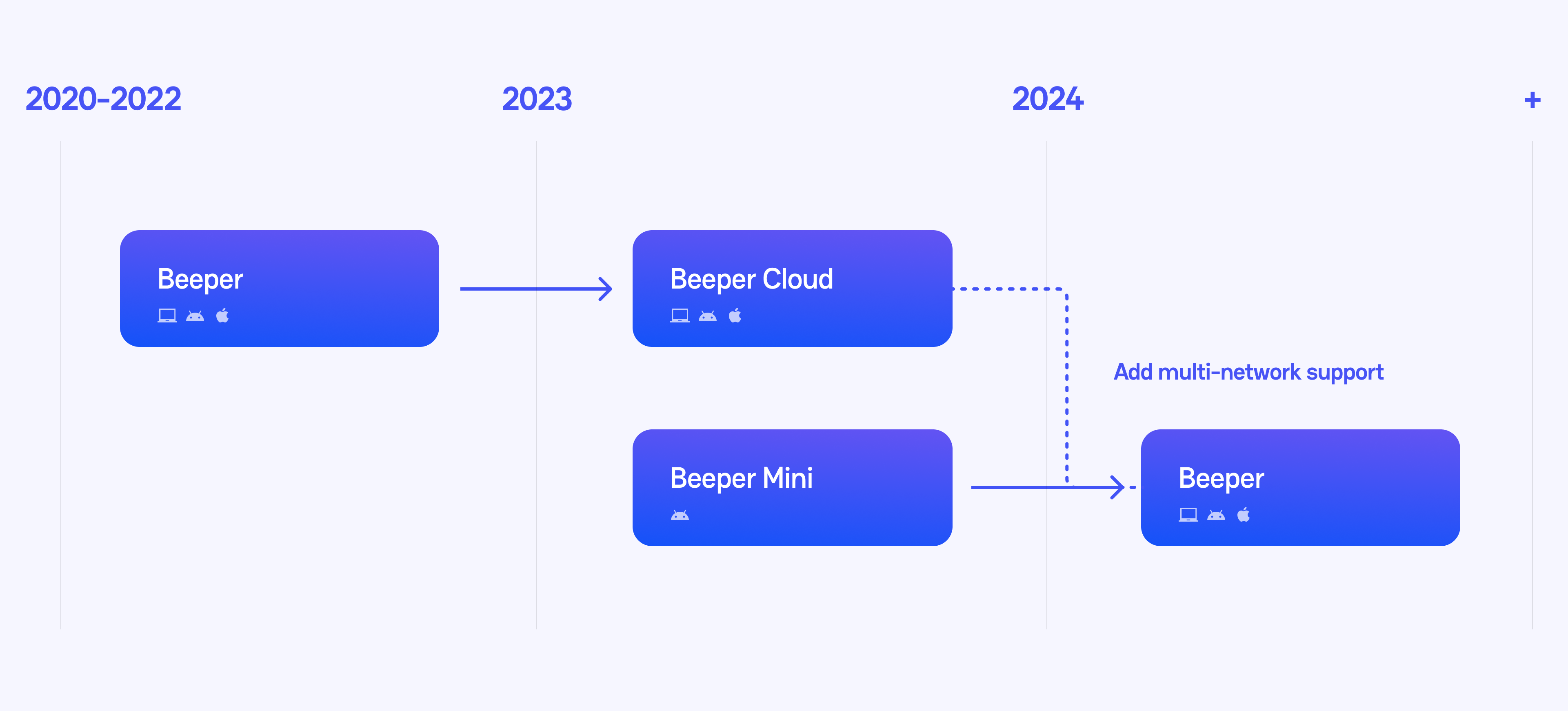
Today, we are renaming our original Beeper apps to Beeper Cloud to clearly differentiate its cloud-based architecture from Beeper Mini’s client-side architecture.
A little bit of history. We started inviting our first beta users to Beeper Cloud in 2020. Even though it’s still in beta, over 25,000 of you sent messages on Beeper Cloud yesterday! With your feedback, we’ve been iterating rapidly on our quest to build the best chat app on earth. One of our most difficult challenges has always been to securely integrate with encrypted chat networks, like iMessage. Our first system architecture used Mac servers in a data center as relays, but this system wasn’t perfect.
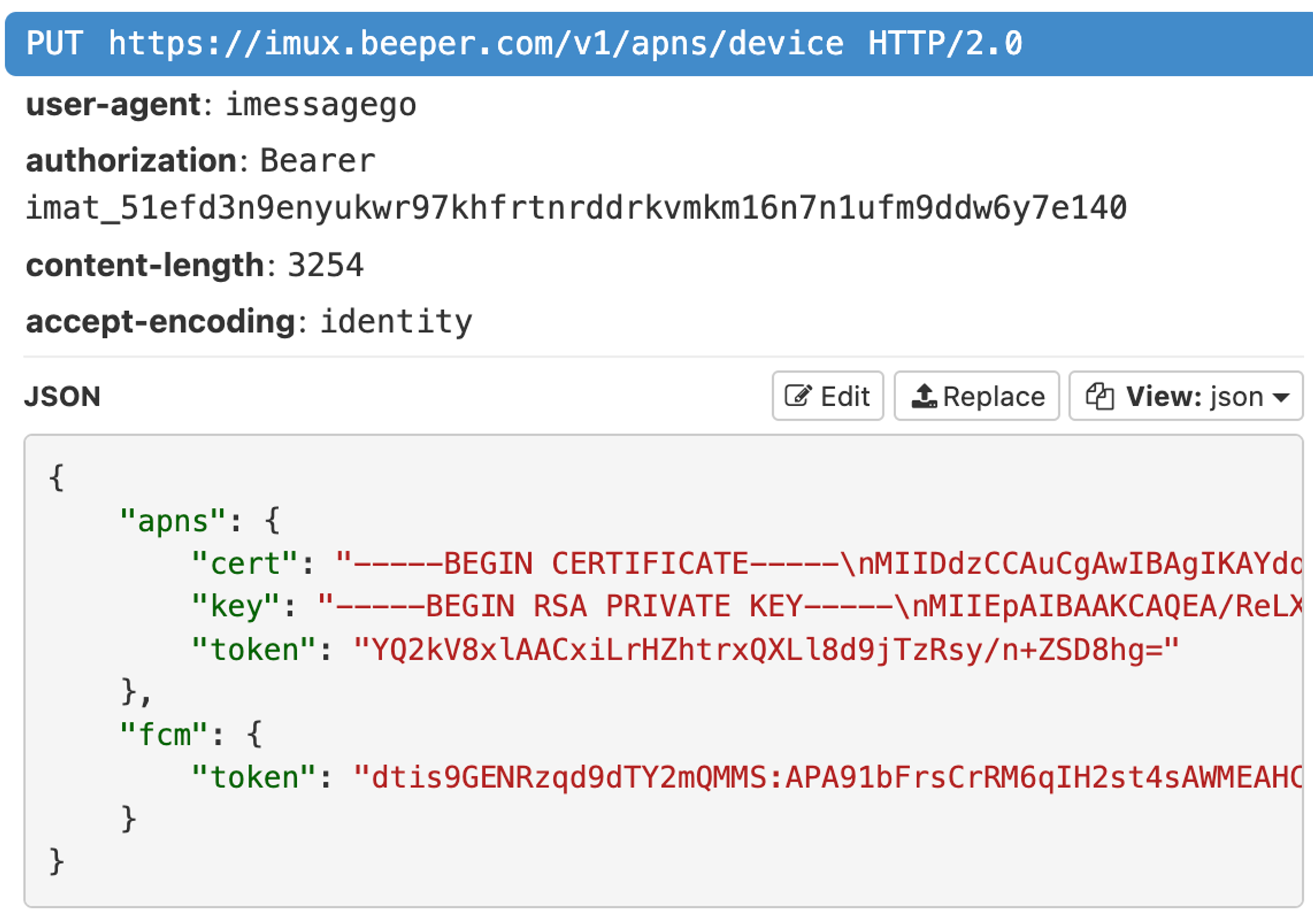
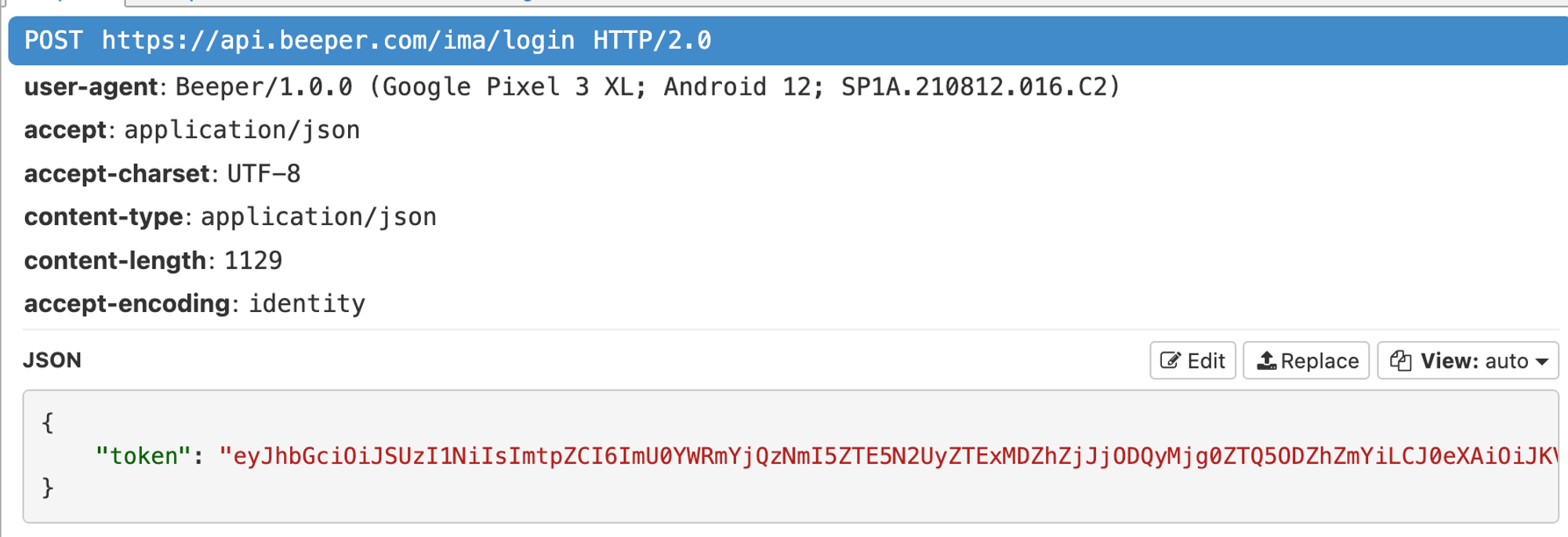
Everything changed in August when a security researcher reverse engineered the iMessage protocol. He published pypush, a proof of concept Python library that enables any type of computer to send and receive end-to-end encrypted messages over the iMessage protocol. This had never been done before – it was a groundbreaking, gigantic achievement of genius and hard work. We immediately began working with him to integrate his research into Beeper Mini and eliminate the need for Mac relay servers.
Unlike Beeper Cloud, which runs Matrix bridges on cloud servers, Beeper Mini connects directly to the remote network. No Matrix server or cloud bridges involved.
If you already use Beeper, you can use Beeper Mini alongside Beeper Cloud. It’s still useful to have Beeper Cloud because there are no Beeper Mini desktop or iOS apps yet.
Product Roadmap
Beeper Mini is now available on Android for anyone to download, no waitlist. There is a waitlist to use Beeper Cloud. Why? Because its cloud server architecture is quite expensive for us to operate and scale up.
At a high level, here’s our product plan for the near future (in very rough order, and very subject to change):
Listen to feedback, fix bugs and build a few quick win features into Beeper Mini. Some of the things we’re working on:
Import past chat history
Full text search
Block list
Chat history backup and export
Android OS chat bubbles
Foldable/tablet UI
Facetime audio and video calls
Scheduled messages
If you have suggestions/feedback/bugs, please send us a message in-app: ⚙️ gear icon → Report a problem. We read every single bit of feedback and use it to help prioritize our roadmap.
Add support for SMS, WhatsApp and Signal into Beeper Mini, using the same end-to-end encrypted client-side connection architecture. No cloud servers in the middle.
Add Matrix support, and the other 10 non-encrypted chat networks into Beeper Mini.
Update our desktop and iOS apps with our beautiful new design language, and client-side end-to-end encrypted connection architecture.
Rename Beeper Mini to Beeper, since it’s not very mini at this point.
Deprecate Beeper Cloud and migrate all users over to Beeper.
The speed at which we do steps 3-6 depend entirely on how many subscribers we get for Beeper Mini, and therefore how much money we have to spend on development. If you are a Beeper Cloud user who has been using the app for free, now is the time to support us! Please buy a subscription to Beeper Mini and help us fund development.
The wait for a cross-platform RCS chat app is over. Beeper now has you covered—update today!
In our quest to build the best chat app on Earth, we’re thrilled to say Beeper now supports Google Messages with full RCS support! Special thanks to all the Beepsters who helped refine and beta test our integration while we previewed it in Beeper Labs. You’re a big reason why RCS messaging is working great in the latest versions Beeper Desktop, Android, and iPhone.
Considering the eager anticipation for RCS support, we’re proud to deliver for the community big-time on this one. You’re using one of the first and only apps to feature RCS messaging on all platforms—way to go!
RCS—aka Rich Communication Services—is a modern messaging standard for doing what SMS and MMS (which have been around since the early 1990s) cannot. RCS is what makes chats on Google Messages dynamic and interactive. Everything you can do over RCS chat is now fully supported in Beeper.
☝️ RCS on Beeper is more reliable and secure than our previous Android SMS connection. RCS messaging consistently delivers an enhanced chat experience without the occasional hiccups we previously encountered.
🚀 Set Up Google Messages + RCS
Set up Google Messages + RCS like you would any other Beeper-supported chat app.
On Beeper 🖥️ Desktop, go to ⚙️ Settings » Chat Networks » SMS/RCS (Google Messages) » Continue to display a QR code.
On your Android phone, open Google Messages. Tap your photo in the top corner to open a menu » select Device pairing.
Tap the QR code scanner on the Device Pairing screen and scan the code displayed on the Beeper Desktop screen. The pairing should complete in a few moments.
As one of the first times we’ve announced a new chat network connection, we’re excited to do so with such a popular and well-loved messaging protocol, with more to come! No other app besides Google Messages itself offers the breadth of RCS capability that Beeper now does.
☝️ Reactions are synced across all devices, even when chatting with an iPhone friend.
We’re also the first app to make it possible for Apple devices to chat over RCS. If you have an Android device with mobile service from a SIM card, Beeper on your iPhone, Mac, or iPad can fully participate in Google Messages conversations.
🧠 How’d We Do It?
With no published API for RCS Messaging, supporting Google Messages presented a challenge. Our engineering team rolled up its sleeves, got down and dirty, and reverse-engineered a working integration based on how Google Messages for web works. Beeper syncs with Google Messages by pairing as a linked device via QR code authentication and VOILA—the first cross-platform RCS messaging app was born.
🚨 Current Beeper Android users should upgrade from the previous SMS connection to the new Google Messages + RCS integration as soon as possible.
Google Messages delivers a more reliable SMS experience in Beeper, in addition to all the rich messaging features (GIFs, stickers, tap reactions, etc.) RCS provides. In a few weeks, Google Messages + RCS will be the only way to send / receive SMS on Beeper Android. Get a head start today and upgrade with our handy Getting Started Guide.
📟 Don’t Be a Stranger!
We believe communication should be effortless, engaging, and enjoyable. With RCS support, Beeper’s making big progress toward that vision. We can’t wait to see how you use these new features to connect with your loved ones.
Update to Beeper Desktop v3.79.17 for double the pleasure and double the fun with stickers + tons of chat enhancements!
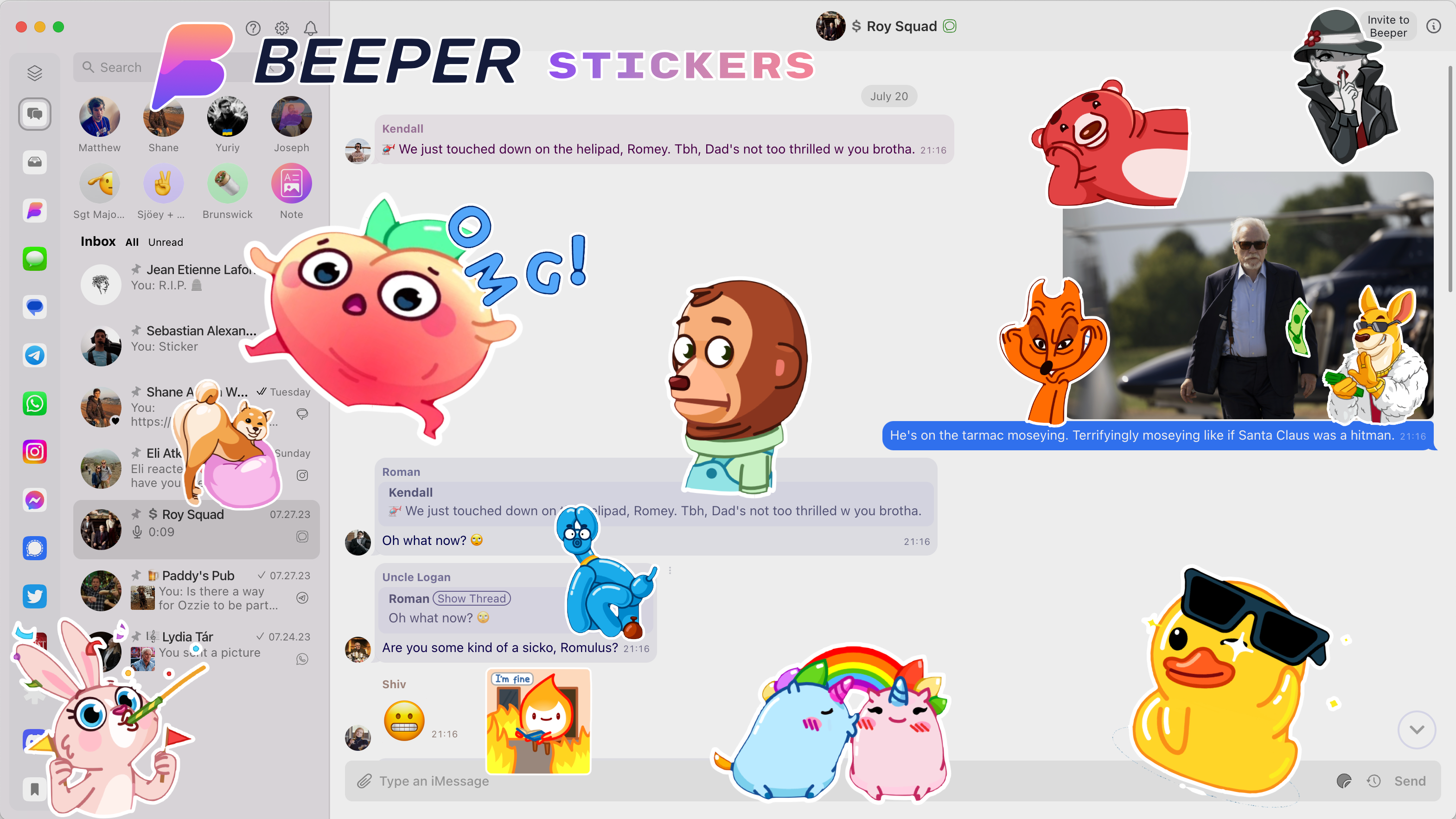
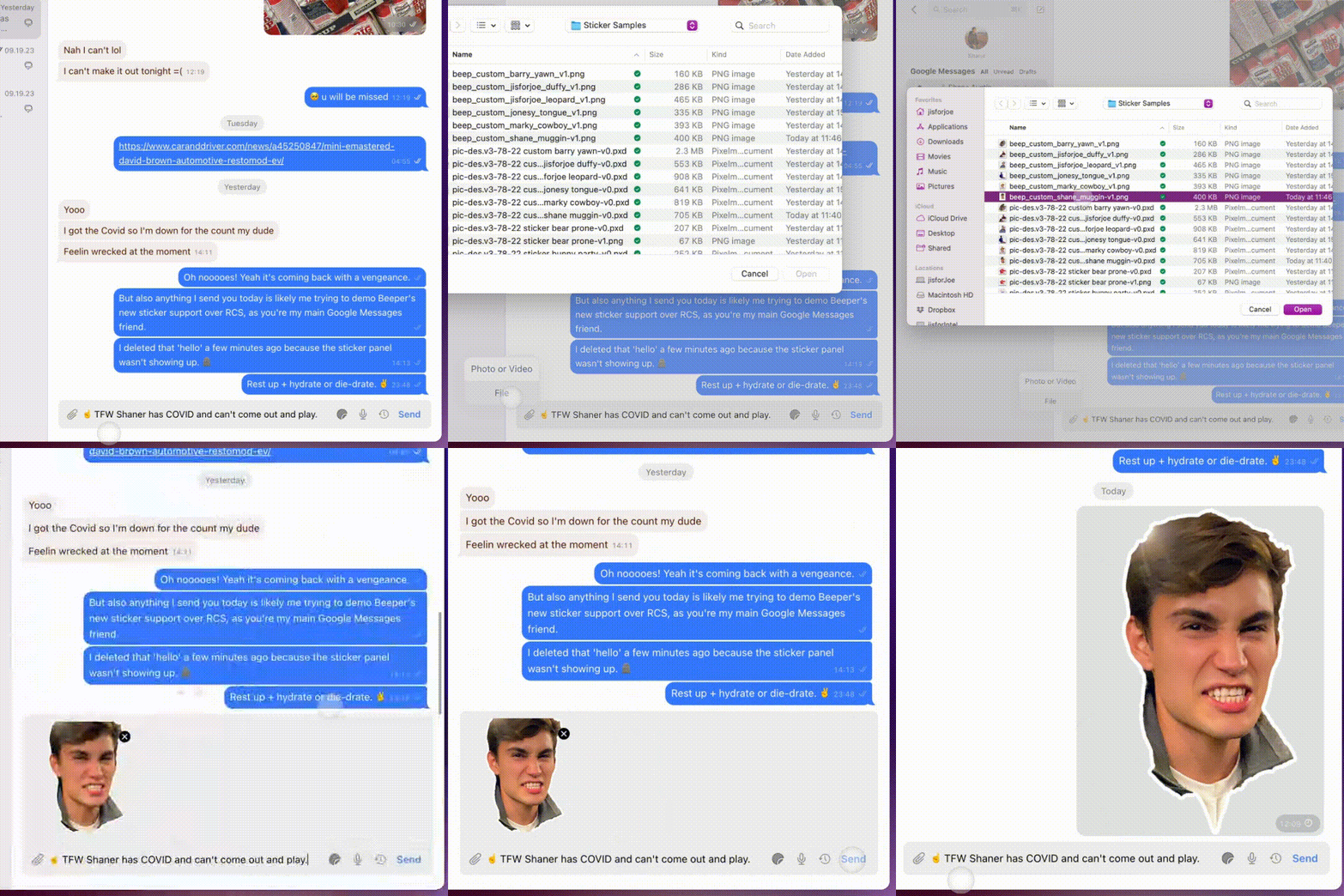
We’re thrilled to announce fresh enhancements in Beeper 🖥️ Desktop v3.79.17 that’ll make chatting across your networks more more fun. Leading the pack are Beeper Stickers (‼️), to spice up your messaging game. The latest version of Beeper Desktop is available now, with full release notes here.
Go to ⚙️ Settings » Help & About » Check for Update to unlock your brand-new superpowers.
If pictures are worth a thousand words, then stickers are a gold mine for expressing yourself without typing a thing. From cheerful “good mornings” and heartwarming “thank yous” to hilarious “LOLz,” Beeper Stickers set the mood in ways words can’t capture.
Our initial collection features popular sticker packs for any mood or occasion. They run the gamut from cute and cuddly to sassy and humorous—there’s a sticker for every vibe! The launch collection is extensive, and theres’s no limit to expanding it more in the future.
📣 If you have a favorite sticker pack you’d like to see in Beeper’s collection, tell us about it here!
🏁 Get Started with Stickers
Update to Beeper Desktop v3.79.17 to install Stickers in ⚙️ Settings » Stickers » + Add Sticker Packs.
Click + Add Sticker Packs to browse the current collection of stickers.
Click the Sticker icon in the chat window’s Composer bar to browse and send your stickers.
☝️ Beeper Stickers work on any chat network that currently supports stickers: iMessage, WhatsApp, Telegram, Signal, and Beeper.
📟 Until Next Time…
We can’t wait to see Beeper Stickers giving your chats that extra ✨je ne sais quoi.✨ We hope you enjoy Stickers as much as we enjoyed making them happen for you.
Start your update engines for fresh enhancements to Beeper Desktop.
We’ve got fresh enhancements in Beeper 🖥️ Desktop v3.78.23 that’ll make chatting across your networks more natural AND more fun.
The latest version of Beeper Desktop is available now, with full release notes here. Go to ⚙️ Settings » Help & About » Check for Update to unlock your brand-new superpowers.
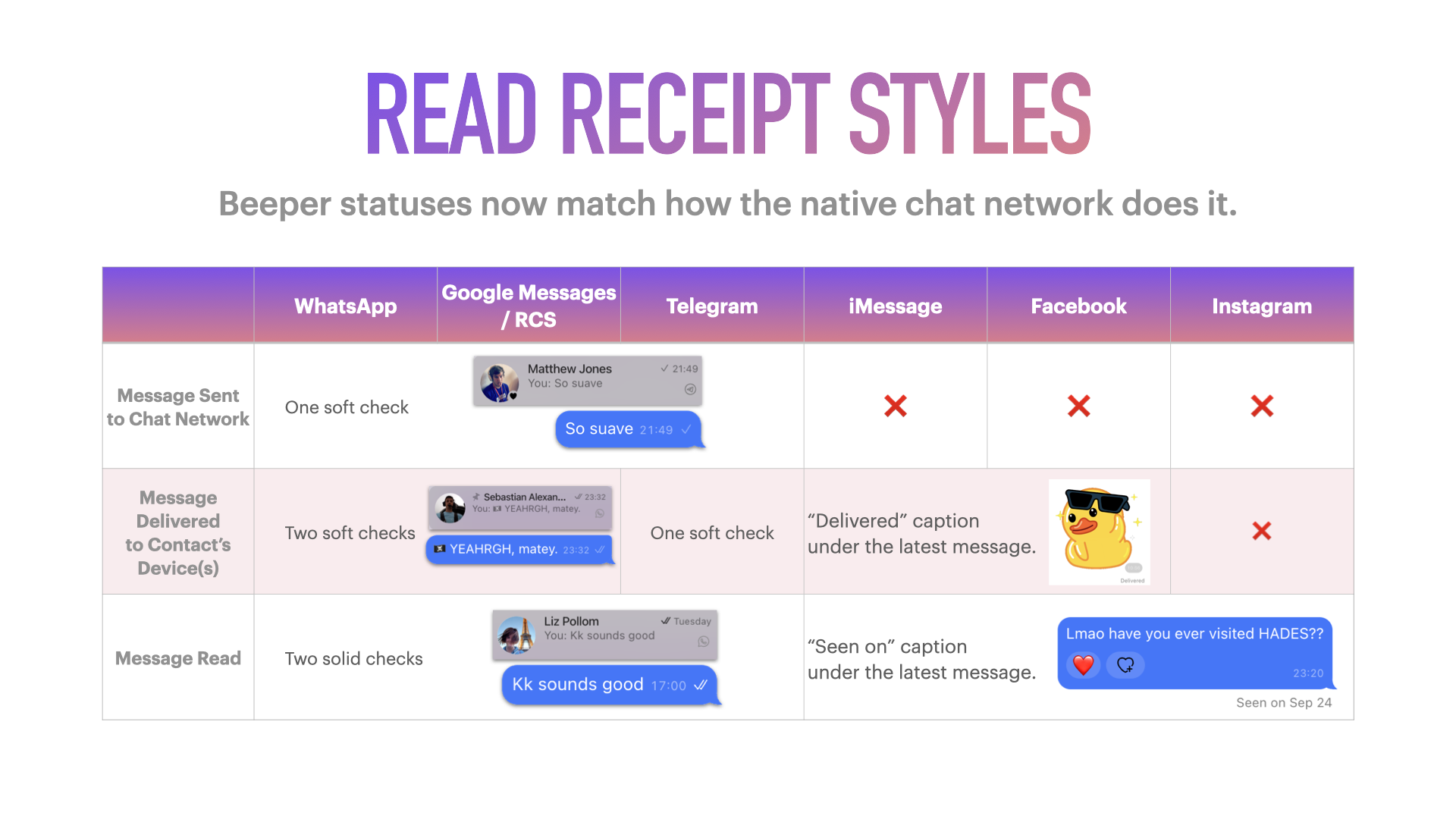
We improved how the status of your DMs appear, keeping you updated as messages go from sending, to delivered, and read.
Read receipts now match how each native chat network does it. Aligning these Beeper elements with the native networks’ styling makes your experience more natural and familiar—a good thing if you ask us!
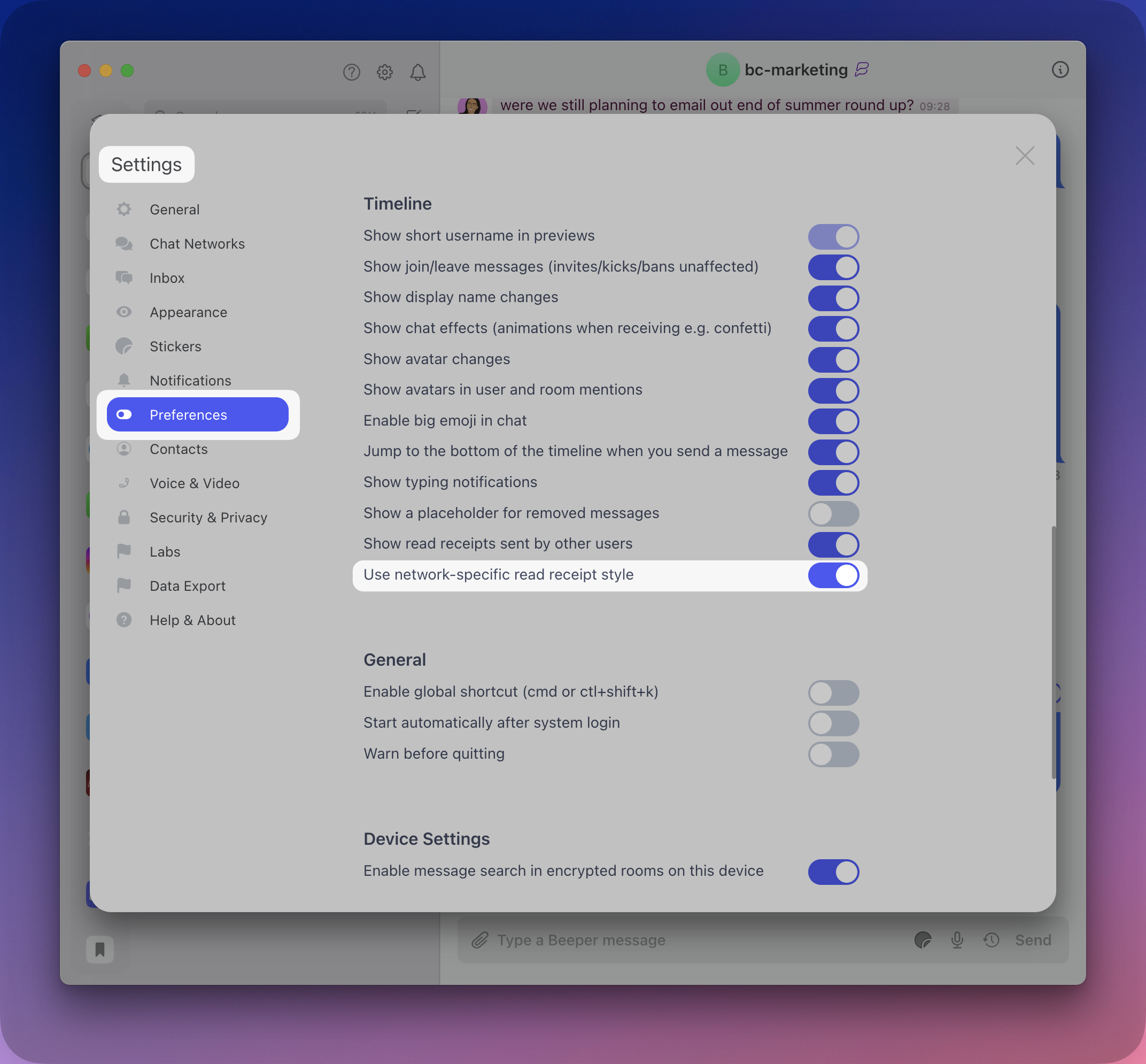
The new receipt styles are ON by default in the latest version of Beeper Desktop. Go to ⚙️ Settings » Preferences » Timeline » Use network-specific read receipt style = OFF for the the old receipt styles.
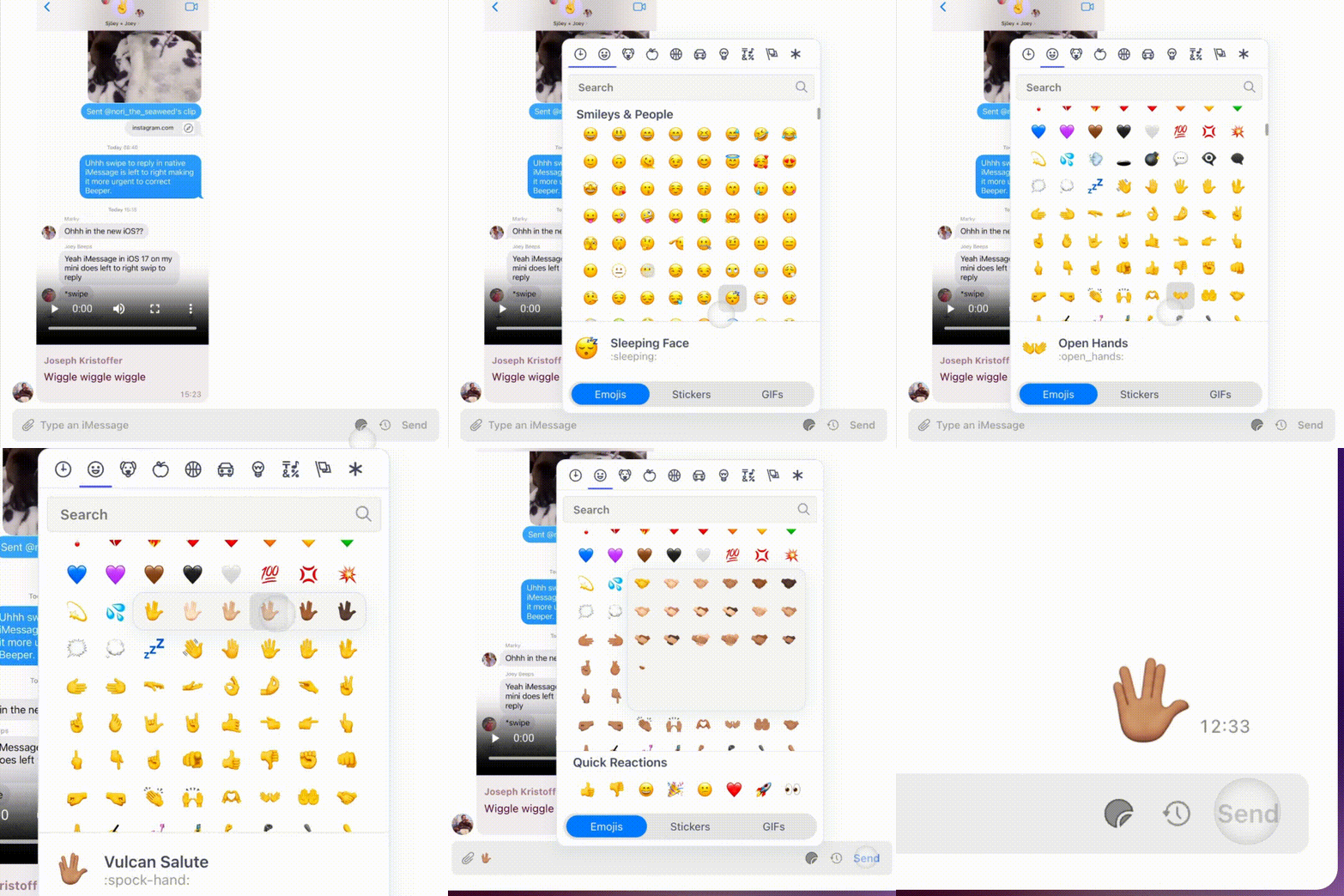
Emoji with skin tone options can now be selected when drafting a message in the Composer bar: Sticker icon » Emojis » hover over a supported emoji.
☝🏽 The skin tone you select will become the default for the emoji picker, quick reactions, and composer auto-complete [i.e. typing colon (:) and the emoji’s name].
🖼️ Media Uploads
Photo and video previews are now shown in the Composer when you attach or drag a file into your chat.
🪄 Refreshed Styling
✔️✔️ Instead of blue checks, the “All Messages Read” checkmarks in the Inbox view are now black checks on the light theme and white checks on the dark theme.
🎞️ Menus now animate when opening them (e.g the emoji picker, right-clicking a message, etc.)
Ready to invite friends and family to Beeper? Cool, let’s do this:
Confirm you’re using the latest version of Beeper 🖥️ Desktop (⚙️ » Help & About » Check for update).
Click ⚙️ » Invite Friends to fetch and copy your personal invite link.
OR
Open any non-Beeper (i.e. non-Matrix) chat.
Click the Invite to Beeper button up top, which will compose a message that includes your Beeper Invite Code (e.g. refer.beeper.com/YTRsJd 👈 folks are free to use this code).
💡 Brand-new Beeper users will see the Invite to Beeper button when their accounts are older than 24 hours.
💝 Accept a Beeper Invite
To redeem a Beeper invite:
Use the invite link to download and install the latest version of Beeper Desktop or visit beeper.com/download. The desktop app is required to redeem invite codes.
Open Beeper » enter your email » press Continue.
Fetch the validation code sent to your inbox » enter it into Beeper » press Continue.
On the screen showing your place on the waitlist, enter the Beeper Invite code where indicated—aaand you’re in!
Invite codes can be redeemed five (5) times within a rolling 24-hour period. Don’t know anyone on Beeper yet, but still want to sidestep the waitlist? Here’s five codes from us to you (aka 25 chances per day to let yourself in):
Introducing a new, hackable surface within Beeper.
Most chat apps are inflexible—you see and send messages on their interface, end of story. If you’re lucky, you’re allowed modest customization options, or maybe offered some sticker packs.
Except for us! Beeper is built upon the open source Matrix protocol, and we actively encourage using your chats to build cool things—even if a network Beeper supports offers no developer tools themselves. Command line clients, voice assistants, and iMessage bots are but a taste of what our community has already made.
Today, we’re excited to announce Beeper Widgets: a new way to do awesome things with chat!
Widgets x Beeper 🥳
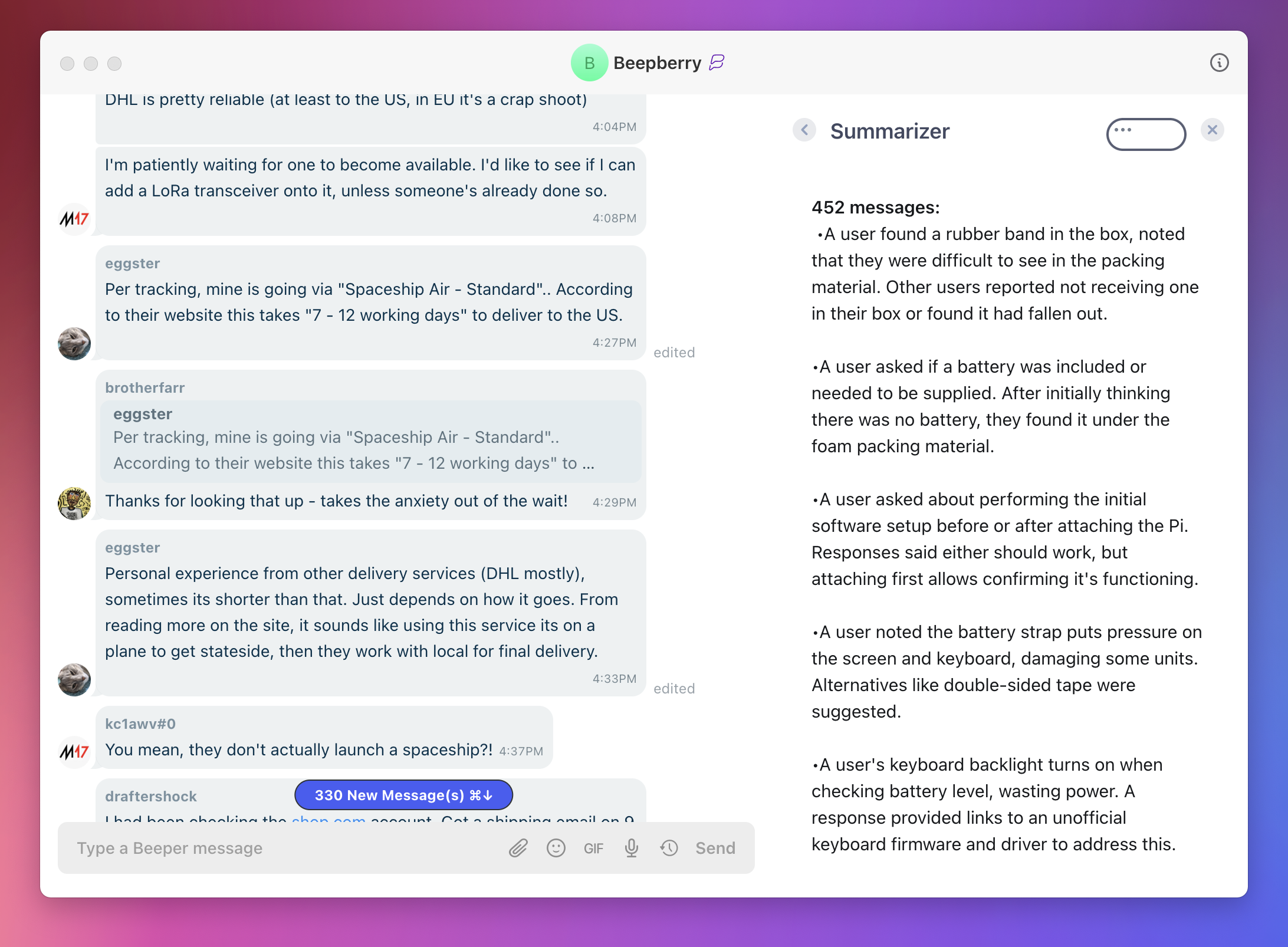
Beeper Widgets are web apps shown inside Beeper that can interact with chat data, like reading messages, seeing participants, and sending or reacting to messages on your behalf. Our widgets are standard web apps built with React, so developers have full freedom to create any interface, interact with other services, and do anything else a website can.
As a feature, the Matrix team and open-source contributors have been nurturing widgets for years now. Today, we’re adding support for Matrix widgets inside Beeper. Our twist is that Beeper Widgets can be used in all chats on any chat network that Beeper supports. This means you can use widgets with WhatsApp, iMessage and 13 other chat networks!
What can Beeper Widgets do? 🤔
We’ve built two widgets: one that summarizes unread messages upon opening a busy chat, and one that provides useful information based on prior chat messages (such as suggesting ideas or providing information).
You can build widgets to do anything! As an example, your widget could:
Send pre-written messages.
Show info about everyone in the chat, using a data source like Clearbit.
Add items within a chat to your to-do list.
Try Beeper Widgets right now 🤳
Choose any of our pre-built widgets here, then follow these instructions to add it to Beeper!
How to create Beeper Widgets 🙌
Widgets you build today can be shared with any and all Beeper users, enhancing their chat experiences and earning you serious love from the community.
A quick tutorial gets you set up to develop your first widget in just five minutes. For a visual walkthrough, check out our Widget video:
Beeper Widgets are built on the wonderful matrix-widget-toolkit package by Nordeck. On top of it, we’ve added more widget functionality and made widgets available globally across all of your chats (rather than being installed on a per-chat basis). We’ve also created example widgets and a simple way to start building.
To hit us up about Beeper Widgets, get help, or share your latest creations, join our dedicated Matrix room #beeper-sdk:beeper.com. We’re excited to play with what you build!
Chat smarter, not harder with our handy cheat codes.
Building the best chat app on earth isn’t about reinventing the wheel. It’s about taking the burden of too many chat apps off your shoulders so you can focus on communicating. Secondly, it’s about baking in the best, most helpful chat features—like keyboard shortcuts—so Beeper can become the only app you need to rule them all.
Like steering wheel-mounted controls in your car, Beeper Shortcuts let you act smarter, not harder—juggling commands that compete for your attention without derailing your flow. Whether you just learned CTRL+C and CTRL+V yesterday to copy and paste or are such a shortcut pro that your mouse can’t remember the last time it felt the warmth of your caress, let’s dive into the power-ups available on Beeper!
🚨 Shortcuts were demoed with an Apple keyboard. For PCs: ⌘ = the CTRL key | ⌥ (Option) = the Alt key.
🔍 Search with ⌘+K
On Beeper, ⌘+K starts a Beeper Search so we live by the mantra “K is for Konnect!” The Search view also shows your recent chats for quick reference.
Replace foraging, clicking, and scrolling for who to message next with this handy cheat code—”K is for konnect!”
🗄️ Archive Power Moves
“Archiving chats? What is this—the future?”
Archiving chats you’re done with (for now) is a true pro-Beeper move. Type ⌘+E to archive and mark a chat as read.
Archive All Read Messages is another powerful Beeper command. From the Inbox, click the 🧹 or type ⌘+Shift+E for the shortcut. Chats return to the Inbox whenever new messages arrive, so archiving is a safe, non-destructive action that brings order to chaos.
The ⌘+; shortcut quickly toggles between Archive and Inbox views and pairs perfectly with the Archive actions above. Try them out!
🪄 Act on Unread Chats
Jump to your most recent unread chat with ⌘+U.
Changed your mind? Type ⌘+Shift+U to mark chats unread.
🗺️ Navigate Chat Lists
Hopping between Beeper chats comes in two flavors of shortcut.
Use ⌘+⌥ (Option)+⬆️ ⬇️ to open chats and mark them read as you move.
For a lighter touch, pressing Esc to restore the Beeper home screen, then hit ⬆️ or ⬇️ to navigate up and down the chat list without making changes. Press ENTER to open the highlighted chat.
🚲 Cycle Through Recents
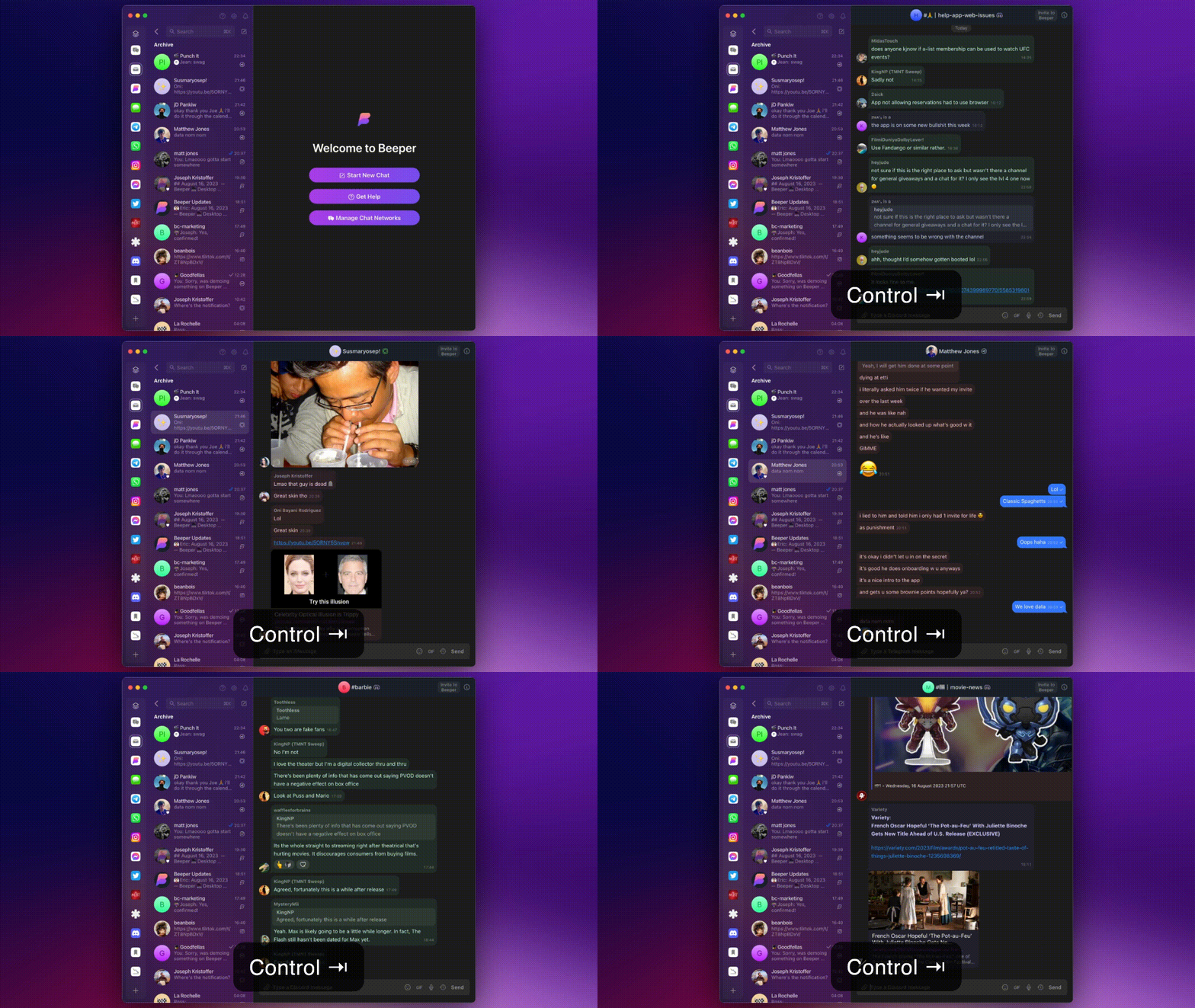
If you frequently use ⌘+Tab (aka Alt+Tab on PCs), you’ll like using Ctrl+Tab to cycle between your twenty most recent chats.
Shortcuts for acting on recent messages may be familiar to Discord, Slack, Telegram users. Start at the Composer field where you write your chats:
Press ⌘+Shift+⬆️ ⬇️ to reply to recents in the thread.
Press ⬆️ ⬇️ to navigate and edit your recent sends.
Editing recent sends is currently supported in: Beeper / Matrix, Discord, Google Chat, Slack, Telegram, and WhatsApp.
🤯 A Shortcut…for Shortcuts?
When you want to jog your memory on a Beeper shortcut, there’s a shortcut for that, too! Type ⌘+/ for a scrollable cheat sheet:
📟 Don’t Be a Stranger
You’ve made it to the end! You may now resume your previously scheduled Beeping.
We’re hiring and are one chat away when you want help, have ideas and feedback, or a problem to report. Spread the love by sharing this post or subscribing to The Beeper Blog.
Whether you’re just starting out, looking to get the most out of Beeper, need help solving a problem, or have ideas and feedback to share, Beeper Support is at your service!
Your Beeper Helper is an AI-powered assistant to answer questions and guide you to through our vast array of help resources. On Beeper 🖥️ Desktop, click ❓ at the top of your chat list to call your assistant:
On Beeper 🍎 iOS, the assistant lives inside Settings (⚙️) » Support » Help:
To find your assistant on Beeper 🤖 Android, tap ⚙️ » Help:
📚 Self-serve Knowledge
Your Beeper Helper pulls its knowledge from help.beeper.com—our main support hub—where you can:
The Beeper Community chat is the place to be for all the Beeper discourse you want. Join fellow Beeper users by clicking ⚙️ » Join Matrix Room and search for Beeper Community.
🖥️ Beeper Desktop is currently required to join the group, but will sync to your 🤖 Android and 🍎 iOS apps once completed.
🛎️ Page a Concierge
Get direct assistance from Beeper’s support squad whenever you need it—just slide into our DMs!
🤳 A 1:1 chat with Beeper Help is created automatically when new users join Beeper. Simply send a DM whenever you need help from a Concierge. Search (Shortcut = ⌘+K) “Beeper Help” to get started.
🐣 Sending a Twitter DM to @onbeeper routes directly to our Concierge team—a good open channel for folks who aren’t Beeper users yet.
Our quest to make Beeper the best chat app on Earth continues. Since sharing our State of the App update in March, we’ve grown the team, added popular features, slayed bugs, and invited many on the Beeper waitlist to join our community.
🙌 We are on track to hit “waitlist zero” in a matter of weeks. Beeper will open its doors to all soon, and we could not be more excited. ‘Til then, look back on the progress we’ve made, ICYMI.
All Beeper journeys start with the desktop app, and it wrangles chats better than ever.
💌 The Inbox, Redesigned
The Inbox is your Beeper base camp, so we’re obsessed with making sure it’s intuitive and satisfying—check out some of our favorites:
✔️✔️ Double blue checkmarks are shown if the chat has been read by the other person.
🪄 Control how your Favorites are ordered and set optional Auto-Archive rules in Settings (⚙️) » Inbox.
🎨 Toggle the formatting for Discord and Slack chats and decide if you’d like to have typing indicators ON or OFF in Settings » Appearance.
👩🚀 Spacebar
Not the one on your keyboard, silly 😜. The Spacebar in Beeper lingo is the menu showing icons of connected networks and Beeper Spaces (i.e. Inbox, Archive, Bookmarks, and Low Priority). On Beeper Desktop, it’s now a vertical shelf that can be toggled open or closed.
Spacebar provides a clear view of your chat networks, with keyboard shortcuts for speedy control:
⌘/CTRL + S to Collapse / Expand the Spacebar ⌘/CTRL + ; to Switch between Inbox / Archive views
💡 Pro Tip: Click the “hamburger” icon (aka the “club sandwich” or “stack of papers”) at the top left to expand and collapse the Spacebar as you like it.
🦸♀️ Schedule Messages with Natural Language
Beeper’s message scheduling feature—a team favorite!—works with any chat network. Scheduled messages deliver when you say so, even if Beeper or your devices aren’t running at the time. Even better: you can now set your timed messages with natural language commands 💣.
To schedule a message: click Scheduled Messages (🕓) and set your delivery time (e.g. “tomorrow at 8am”) in the refreshed menu. Schedule by precise mm/dd/yyyy, hh:mm in the field above.
🚀 Supercharged Forwarding
Message and media forwarding is a core feature Beeper handles like a champ. On Beeper, you have the power to forward messages to people on ALL of your chat networks at the 👏 same 👏 dang 👏 time.
Pass a hilarious GIF you received in iMessage to a Telegram group chat and your low-key-toxic boss on WhatsApp all at once. Beeper can handle it.
To forward: right-click on a message » select Forward Message » pick the contact(s) or group(s) you want with the search bar provided » click Send (or the keyboard shortcut: ⌘/CTRL + Enter).
🔍 Search
Beeper now delivers infinitely better search results (⌘/CTRL + K), making things more digestible at a glance. Results fall into two main buckets: Chats (aka contacts who match your search) and Messages (for conversations your search term appears in).
People results sort into one line per contact, expanding to show all the networks (e.g. iMessage, Telegram, WhatsApp, etc.) your friend can be reached at. We’re continuing to improve the search experience, and we’re working to bring full message search to Beeper iOS and Android as well.
💡 Pro Tip: Refine and filter your results with useful keywords like imessage, telegram, and whatsapp.
🤖 Beeper Android
🪐 New Spacebar = Out of This World
A fresh Spacebar experience arrived on Beeper Android just this week.
Dragging up from the bottom expands the new dock so you can search, reorder your Spaces, show or hide the Expanded Dock, and scroll through Recent Chats.
🏁 Beeper on Android Auto
Beeper works beautifully with Android Auto! Chatting safely while driving feels so good: incoming chats arrive clearly, which Google Assistant can read for you. Easy-to-find buttons let you reply or mute the chat without taking your attention off the road.
The latest Beeper chat lives in Android Auto’s grid view of apps with buttons to read or reply (left). Opening Beeper (center) brings you to a list of recent chats to review or act on (right).
📥 New Inbox View
Our latest Android update sees the Inbox rebuilt from the ground up, better matching Beeper Desktop’s look and feel.
In addition to up to being 10x faster when “cold starting” the app fresh, long-pressing on chat threads and individual messages calls up an improved menu with popular commands and reactions.
⌚️ Notifications for the Pebble Watch
We threw it back in time, showing love to the Pebble community. Our pioneering smartwatch project has devoted, active Pebblers to this day.
Pebble watches paired to Android phones will show Beeper messages just like any other apps you’ve granted notification permissions to.
📸 Full-Res Photos for All Networks
Send full-resolution pics to all networks you chat on.
If you DO want to compress an image: tap the thumbnail in your draft message before sending it. Uncheck “Send image with the original size” in the Edit screen that pops up.
🧹 Dismiss Notifications When Read on Desktop
After reading a chat on Beeper Desktop, the status will sync to your other Beeper devices, clearing any old notifications.
Coming soon to Beeper iOS too!
⚡️ Speedy Start Ups
Beeper Android is super speedy now. Starting up in under a second, we shaved 1–2 seconds from previous load times. Dramatically speeding up the chat view is next on the menu.
🍎 Beeper iOS
✨ Revamped Chat View
We unveiled a comprehensive refresh to the Chat View last week—a project months in the making. We rethought the Beeper iOS experience from the ground-up, aligning better with how Beeper Desktop feels.
👇☝️ A floating Archive bar and Inbox button lets you toggle quickly between these two essential views:
💬 Redesigned message bubbles, replies, read receipts, and reactions look and work great:
🔠 Rich Text like links, phone numbers, mentions, Markdown, and more arrive with the proper formatting for the type of content it is:
🐇 Handling images, videos, and thumbnails is vastly-improved in the latest versions of Beeper iOS:
🥰 Thanks to all who took evolving iOS features for a spin in Labs. Your mindful feedback helps us every day in making Beeper more awesome.
✌️ Quick Reactions with Taps
Double-tap and tap-and-hold on Beeper iOS now match our expectations when chatting. Performing either finger combo unlocks emoji replies and quick actions:
📺 New Video Player
Our iOS team is really proud of the video player refinements we delivered. We hope you love it too:
Handy playback controls are at your fingertips, which get out of the way with a tap or after a few seconds:
🎁 Share to other apps.
⏪️ ⏩️ Jump forward or backward 10s.
🔒 Lock video orientation.
🐢 » 🐇 Menu (•••) » Set playback speed to: .5x, 1x 1.5x, or 2x.
🗄️ Menu (•••) » Download video.
After watching, any background audio Beeper paused for your video will resume.
⌨️ Emoji Shortcuts
Quickly add emoji like 🎉 while you’re chatting with keyboard shortcuts like :tada:.
A dynamic menu slides open when you type colon (:) plus a letter, refining your emoji choices as you get more specific.
🔍 Act on Search Results
Like Beeper Desktop, your search results can be Pinned, Favorited, Muted, and Marked Unread right from the Search view.
Results for the same contact across multiple chat networks are now shown in a single row with a dropdown.
♾️ Background Sync
Faithfully reflecting the state of your messaging life at all times is one of the most important things Beeper can do for you. Updating Beeper iOS to sync discreetly in the background means you can focus on your conversations without worrying anything’s been lost or delayed.
The upgrades to how Beeper iOS syncs also eliminated a bothersome lag we noticed when re-opening Beeper after being dormant for a while.
🌐 All Apps
In our march to make Beeper the only chat app you’ll ever need, we worked hard to craft an experience that’s consistent between devices:
📥 The Inbox now shows the read status of your chats (✔️ = you have read / ✔️✔️ = everyone in the chat has read).
💬 Google Chat is now available to connect!
🎙 Voice Messages
Voice notes can be up to ten minutes long—recording one is easy:
Click Send voice message (🎙️) to record. Trash or Stop recording with the buttons to the left of the sound wave.
🚧 Voice Notes for Beeper iOS is coming soon—ready on Desktop + Android now!
🍄 iMessage Power-Ups
As a top reason many users first come to Beeper, we have a lot riding on keeping the iMessage experience enjoyable and reliable. More and more people are stowing iMessage away with notifications off, trusting Beeper to handle things instead.
⚡️ Our iMessage bridge is now faster and more reliable.
✍️ Sending media with captions now works!
👯♂️👯♀️ You can now create new iMessage group chats on Beeper Desktop and Android. Support in Beeper iOS is not far behind!
👊 Beating Twitter & WhatsApp to the Punch
At Twitter, full emoji reactions, threaded replies, image captions, and voice messages came to their DM protocol in May, but we can’t blame you if you missed ‘em! Even now—with Beeper rolling out these DM features—Twitter’s own website and apps haven’t implemented them uniformly across their ecosystem.
Our team pulled the same magic on WhatsApp, rolling out support for uncompressed HD images and video (to all your chat networks, btw) while WhatsApp’s own implementation remains limited to select beta testers. 😏
👋 Reporting a Problem
The Beeper community’s feedback and diligent reporting is crucial to making Beeper more awesome. Please keep up the good work! To get help or connect with us quickly, you can:
🤙 Submit feedback or search our Knowledge Base right from our apps.
🤳 Upload screenshots or video and provide additional metadata to your help reports.
📋 Long press any message » Report a Problem to alert our team with useful background information relevant to that message/conversation automatically attached.
👀 What’s Next?
We’ll be in touch more regularly here and elsewhere as we keep working on the only app that let’s you “chat wherever they’re at.” Until next time, here’s a peek at some of the things we’re currently working on:
✨Stickers✨ and better GIFs selection.
🤝 Google Messages bridge—with RCS support!
🕵️ Deliver a new Search interface for iOS and Android.
🗑️ Delete chats and block contacts.
💬 Refreshing Beeper Android’s chat view and speeding up its performance.
⬆️ Add Beeper to the iOS sharing menu.
💅 Continued refinement of Beeper iOS’ Chat view.
📶 Improving performance in low-bandwidth scenarios (e.g. underground on a subway, low signal strength in remote areas, etc.).
🚧 Rebuilding our Signal bridge for performance, speed, and reliability.
😜 Please do not ask us for ETAs. If you ask, we’ll slow work down on purpose—j/k!
Introducing Beepberry – a portable e-paper computer for hackers, designed for chatting on Beeper
Last year, I had an idea for a fun side project – I wanted to create a ‘weekend’ device that would let me stay in touch with friends and family, without the distractions of a full smartphone. I imagined a tiny, hackable e-paper screen with a physical keyboard, powered by a Raspberry Pi, that I could use to chat and pretty much nothing else.
Before Beeper, the idea probably would not have gone anywhere. Most chat apps do not have an API, making it practically impossible to hack something like this together.
Enter Beeper, with connections to 15+ chat networks. Built on top of Matrix, Beeper is fully hackable. You can write alternative clients, bots and more!
I reached out to @sqfmi (who had built the amazing Watchy) and we teamed up to create this tiny computer.
If you’re a hacker and want to play with one, you can pre-order one today for $79:
Beepberry is a portable computing device, with a beautiful high contrast, high resolution display, and a tactile keyboard + touchpad. It is the ultimate everyday hacking gadget.
Powered by the Raspberry Pi Zero W (or any other compatible SBCs), you can use it as a chat device (supporting all chat networks on Beeper e.g. iMessage/WhatsApp/Signal/etc. ) or use it as a hackable handheld cyberdeck, running any Linux application that runs on the Pi.
This is not a finished product. It is a devkit!
Specs
Open source hardware & software
Ultra-low power high contrast Sharp Memory LCD 2.7″ 400 x 240
Raspberry Pi Zero W (included) and compatible low profile header
Connectivity: wifi and bluetooth
Tactile Keyboard w/ Backlight and Touchpad
Programmable RGB LED for notifications and side button
Onboard RP2040 Controller (for keyboard and peripherals control)
GPIOs breakout
USB-C programming & charging
2000mAh LiPo battery
You supply a micro SD card
This is for hackers!
You must be familiar with Linux in order to get any sort of value out of this device! There is no case (though you can 3D print one!), the battery hangs off the back, and you need to configure/set up the software. Don’t expect something perfect.
Ideas…
We’ve created a skinned version of gomuks (CLI Matrix client), optimized for e-paper screen.
Expand via USB ports or GPIO. Add an LTE modem, LoRA, etc.