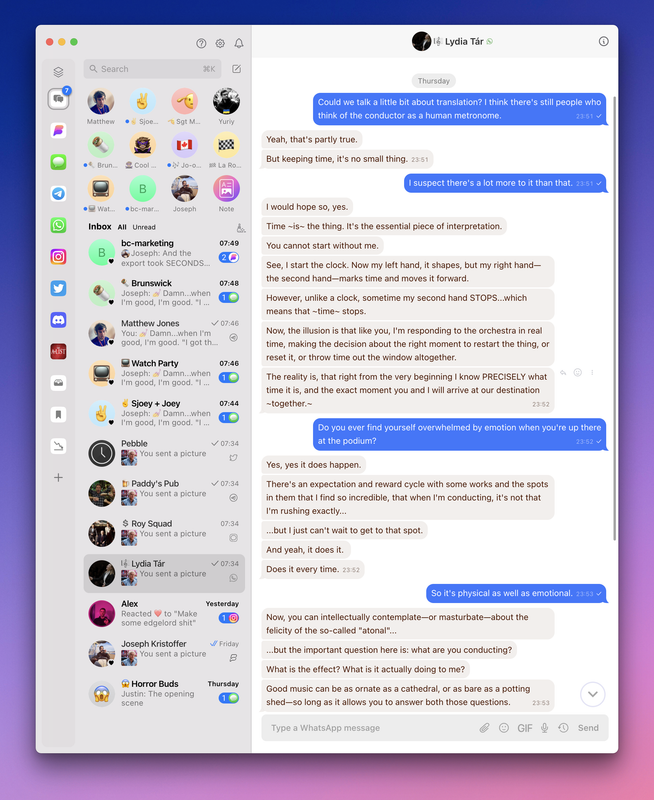
The wait for a cross-platform RCS chat app is over. Beeper now has you covered—update today!
In our quest to build the best chat app on Earth, we’re thrilled to say Beeper now supports Google Messages with full RCS support! Special thanks to all the Beepsters who helped refine and beta test our integration while we previewed it in Beeper Labs. You’re a big reason why RCS messaging is working great in the latest versions Beeper Desktop, Android, and iPhone.
Considering the eager anticipation for RCS support, we’re proud to deliver for the community big-time on this one. You’re using one of the first and only apps to feature RCS messaging on all platforms—way to go!
RCS—aka Rich Communication Services—is a modern messaging standard for doing what SMS and MMS (which have been around since the early 1990s) cannot. RCS is what makes chats on Google Messages dynamic and interactive. Everything you can do over RCS chat is now fully supported in Beeper.
☝️ RCS on Beeper is more reliable and secure than our previous Android SMS connection. RCS messaging consistently delivers an enhanced chat experience without the occasional hiccups we previously encountered.
🚀 Set Up Google Messages + RCS
Set up Google Messages + RCS like you would any other Beeper-supported chat app.
On Beeper 🖥️ Desktop, go to ⚙️ Settings » Chat Networks » SMS/RCS (Google Messages) » Continue to display a QR code.
On your Android phone, open Google Messages. Tap your photo in the top corner to open a menu » select Device pairing.
Tap the QR code scanner on the Device Pairing screen and scan the code displayed on the Beeper Desktop screen. The pairing should complete in a few moments.
As one of the first times we’ve announced a new chat network connection, we’re excited to do so with such a popular and well-loved messaging protocol, with more to come! No other app besides Google Messages itself offers the breadth of RCS capability that Beeper now does.
☝️ Reactions are synced across all devices, even when chatting with an iPhone friend.
We’re also the first app to make it possible for Apple devices to chat over RCS. If you have an Android device with mobile service from a SIM card, Beeper on your iPhone, Mac, or iPad can fully participate in Google Messages conversations.
🧠 How’d We Do It?
With no published API for RCS Messaging, supporting Google Messages presented a challenge. Our engineering team rolled up its sleeves, got down and dirty, and reverse-engineered a working integration based on how Google Messages for web works. Beeper syncs with Google Messages by pairing as a linked device via QR code authentication and VOILA—the first cross-platform RCS messaging app was born.
🚨 Current Beeper Android users should upgrade from the previous SMS connection to the new Google Messages + RCS integration as soon as possible.
Google Messages delivers a more reliable SMS experience in Beeper, in addition to all the rich messaging features (GIFs, stickers, tap reactions, etc.) RCS provides. In a few weeks, Google Messages + RCS will be the only way to send / receive SMS on Beeper Android. Get a head start today and upgrade with our handy Getting Started Guide.
📟 Don’t Be a Stranger!
We believe communication should be effortless, engaging, and enjoyable. With RCS support, Beeper’s making big progress toward that vision. We can’t wait to see how you use these new features to connect with your loved ones.
Update to Beeper Desktop v3.79.17 for double the pleasure and double the fun with stickers + tons of chat enhancements!
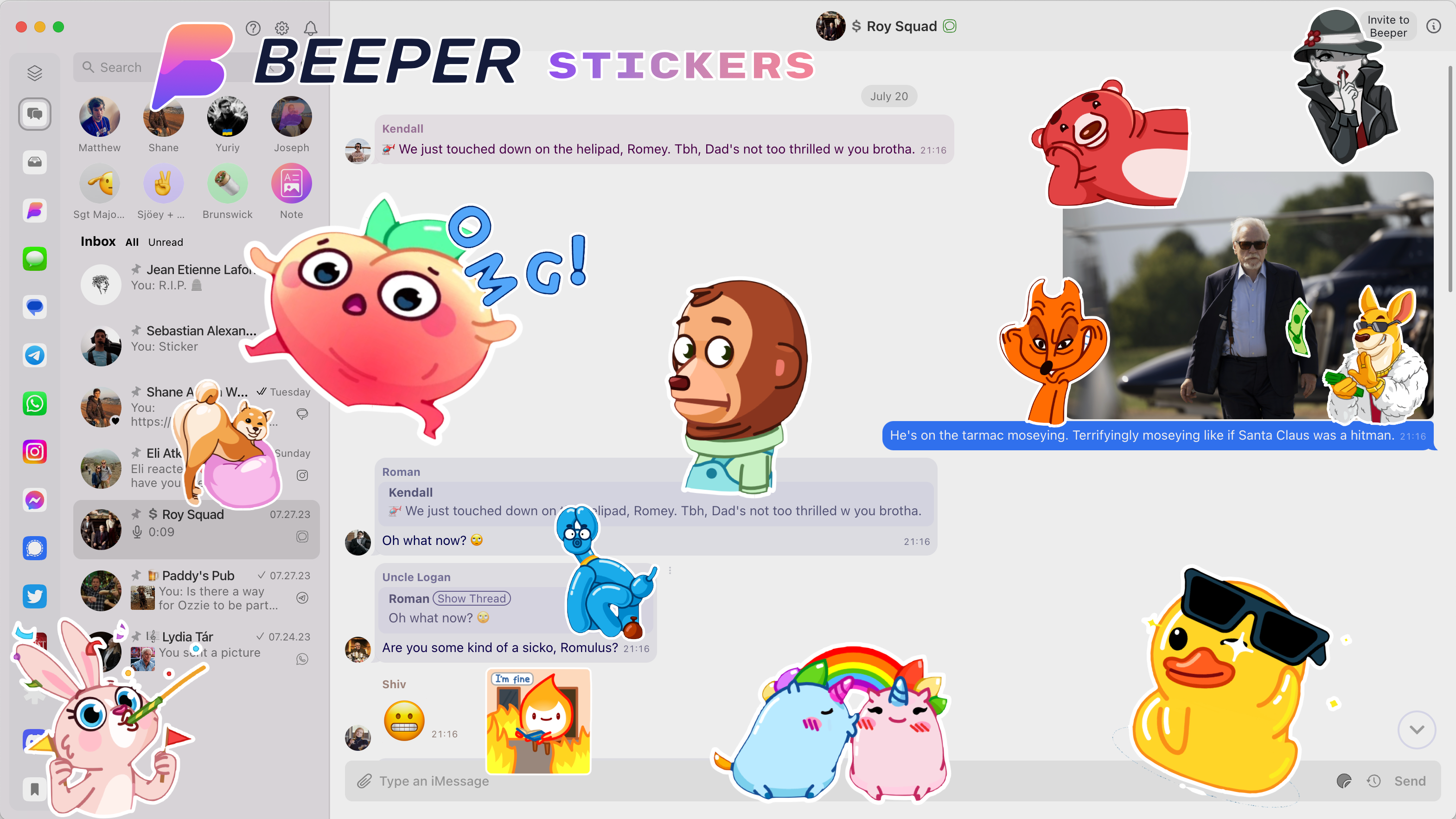
We’re thrilled to announce fresh enhancements in Beeper 🖥️ Desktop v3.79.17 that’ll make chatting across your networks more more fun. Leading the pack are Beeper Stickers (‼️), to spice up your messaging game. The latest version of Beeper Desktop is available now, with full release notes here.
Go to ⚙️ Settings » Help & About » Check for Update to unlock your brand-new superpowers.
If pictures are worth a thousand words, then stickers are a gold mine for expressing yourself without typing a thing. From cheerful “good mornings” and heartwarming “thank yous” to hilarious “LOLz,” Beeper Stickers set the mood in ways words can’t capture.
Our initial collection features popular sticker packs for any mood or occasion. They run the gamut from cute and cuddly to sassy and humorous—there’s a sticker for every vibe! The launch collection is extensive, and theres’s no limit to expanding it more in the future.
📣 If you have a favorite sticker pack you’d like to see in Beeper’s collection, tell us about it here!
🏁 Get Started with Stickers
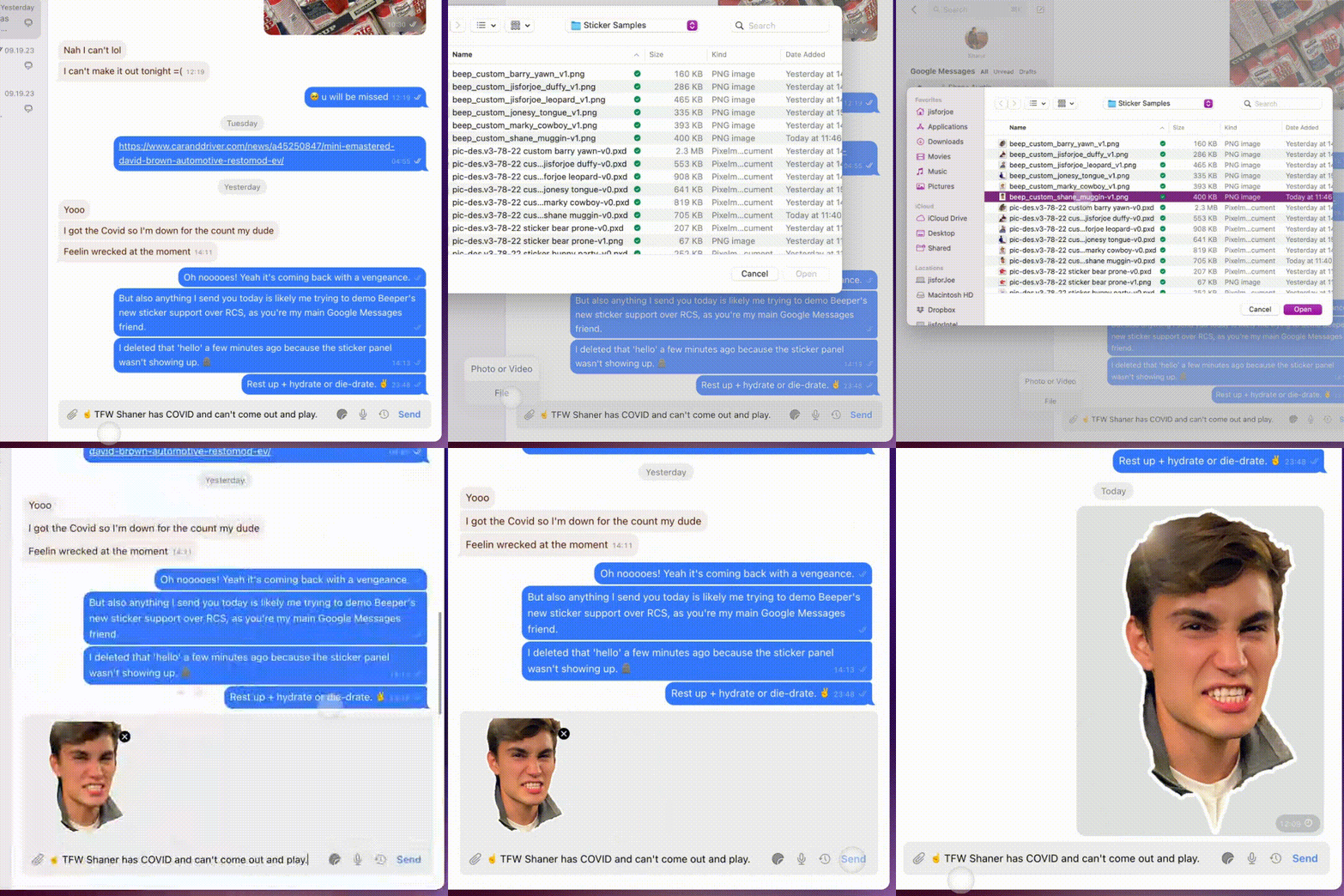
Update to Beeper Desktop v3.79.17 to install Stickers in ⚙️ Settings » Stickers » + Add Sticker Packs.
Click + Add Sticker Packs to browse the current collection of stickers.
Click the Sticker icon in the chat window’s Composer bar to browse and send your stickers.
☝️ Beeper Stickers work on any chat network that currently supports stickers: iMessage, WhatsApp, Telegram, Signal, and Beeper.
📟 Until Next Time…
We can’t wait to see Beeper Stickers giving your chats that extra ✨je ne sais quoi.✨ We hope you enjoy Stickers as much as we enjoyed making them happen for you.
Start your update engines for fresh enhancements to Beeper Desktop.
We’ve got fresh enhancements in Beeper 🖥️ Desktop v3.78.23 that’ll make chatting across your networks more natural AND more fun.
The latest version of Beeper Desktop is available now, with full release notes here. Go to ⚙️ Settings » Help & About » Check for Update to unlock your brand-new superpowers.
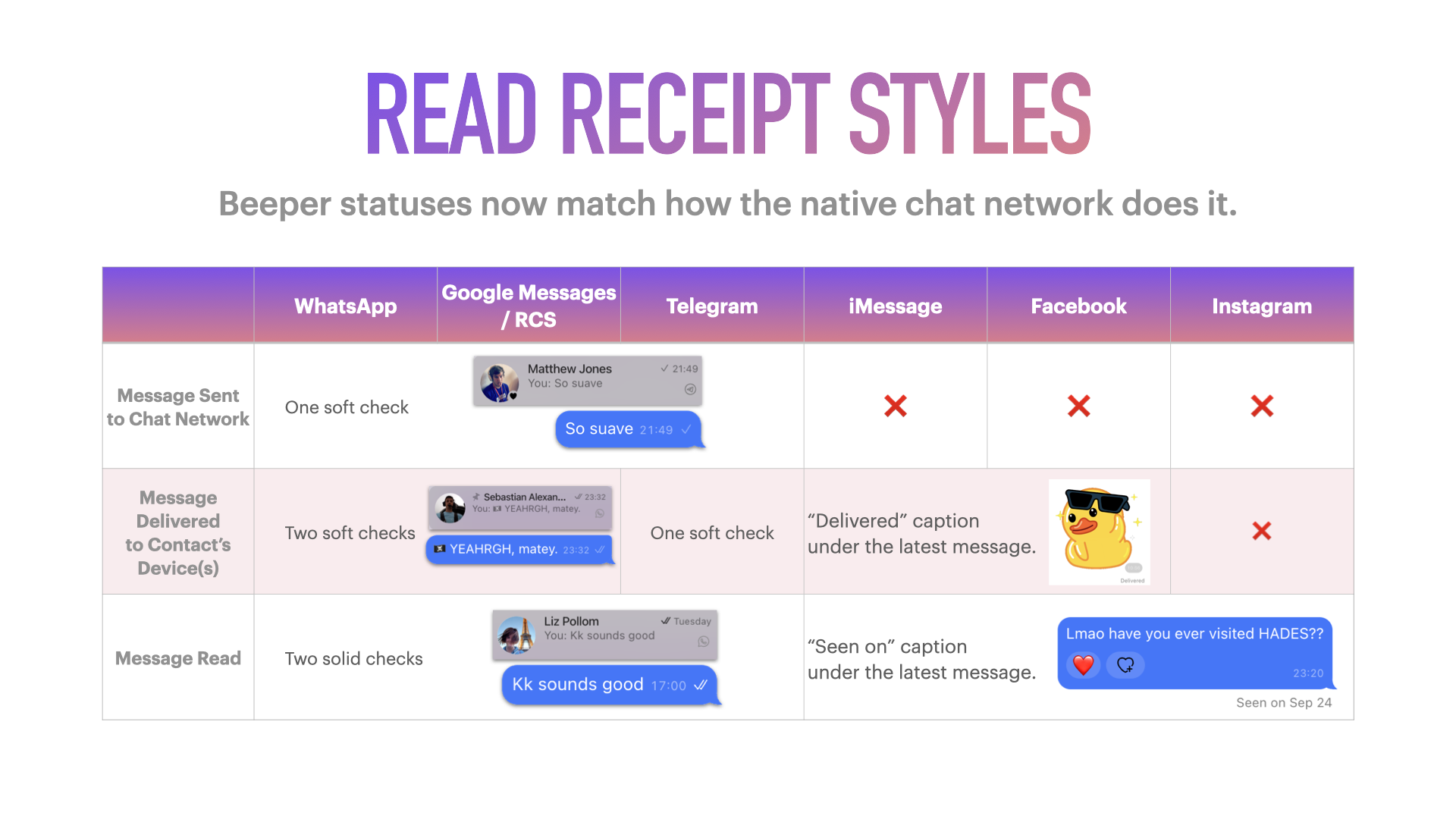
We improved how the status of your DMs appear, keeping you updated as messages go from sending, to delivered, and read.
Read receipts now match how each native chat network does it. Aligning these Beeper elements with the native networks’ styling makes your experience more natural and familiar—a good thing if you ask us!
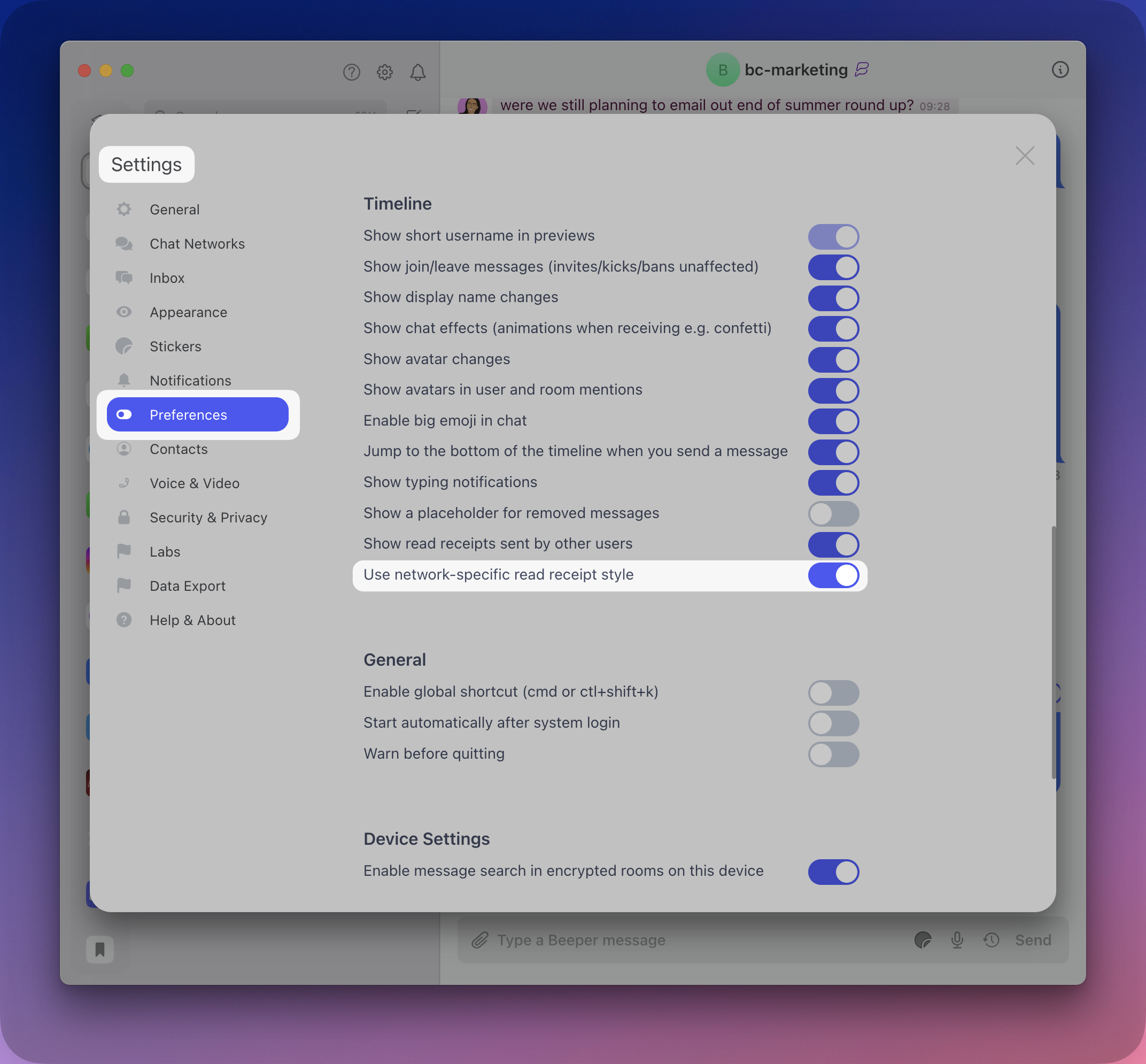
The new receipt styles are ON by default in the latest version of Beeper Desktop. Go to ⚙️ Settings » Preferences » Timeline » Use network-specific read receipt style = OFF for the the old receipt styles.
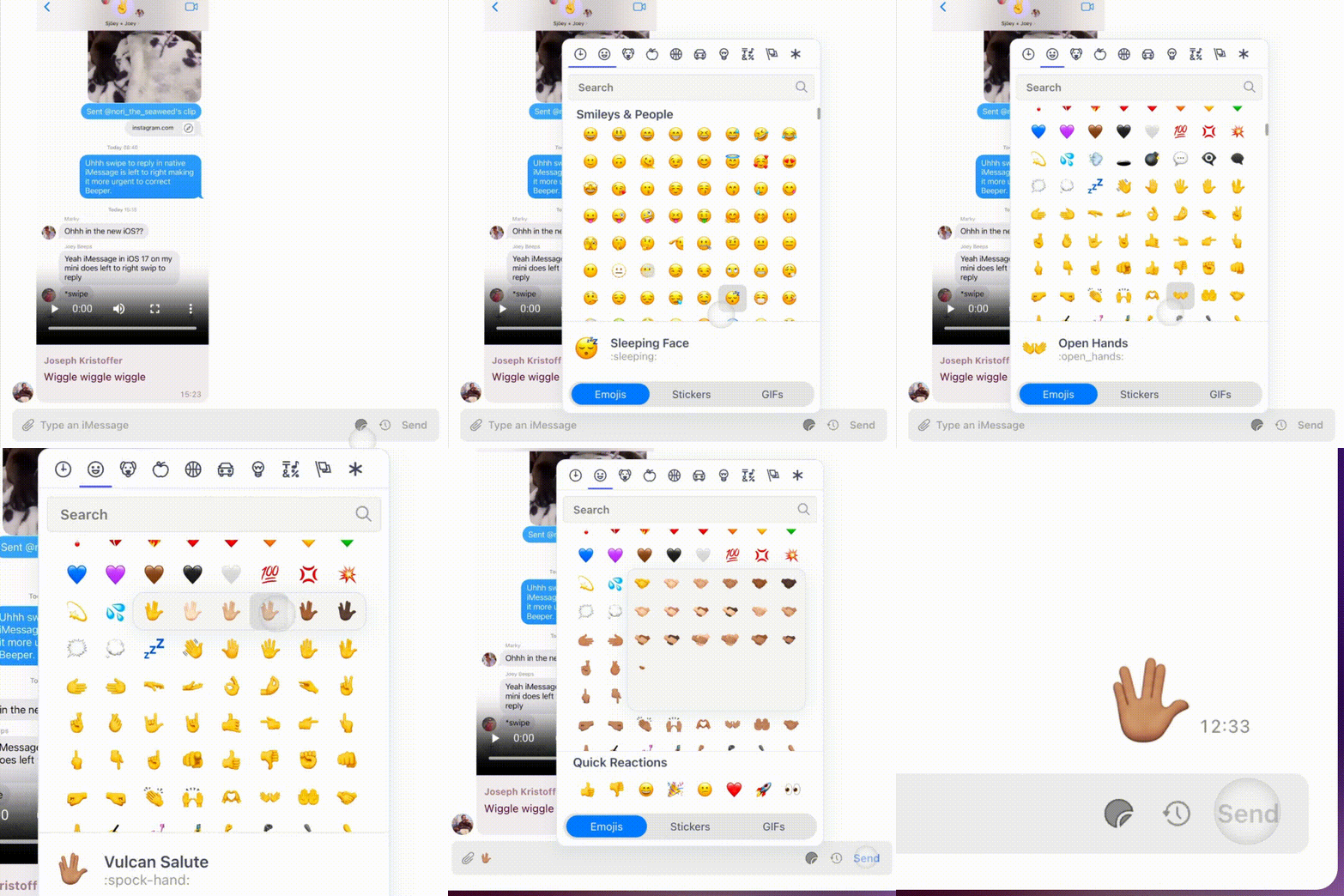
Emoji with skin tone options can now be selected when drafting a message in the Composer bar: Sticker icon » Emojis » hover over a supported emoji.
☝🏽 The skin tone you select will become the default for the emoji picker, quick reactions, and composer auto-complete [i.e. typing colon (:) and the emoji’s name].
🖼️ Media Uploads
Photo and video previews are now shown in the Composer when you attach or drag a file into your chat.
🪄 Refreshed Styling
✔️✔️ Instead of blue checks, the “All Messages Read” checkmarks in the Inbox view are now black checks on the light theme and white checks on the dark theme.
🎞️ Menus now animate when opening them (e.g the emoji picker, right-clicking a message, etc.)
Ready to invite friends and family to Beeper? Cool, let’s do this:
Confirm you’re using the latest version of Beeper 🖥️ Desktop (⚙️ » Help & About » Check for update).
Click ⚙️ » Invite Friends to fetch and copy your personal invite link.
OR
Open any non-Beeper (i.e. non-Matrix) chat.
Click the Invite to Beeper button up top, which will compose a message that includes your Beeper Invite Code (e.g. refer.beeper.com/YTRsJd 👈 folks are free to use this code).
💡 Brand-new Beeper users will see the Invite to Beeper button when their accounts are older than 24 hours.
💝 Accept a Beeper Invite
To redeem a Beeper invite:
Use the invite link to download and install the latest version of Beeper Desktop or visit beeper.com/download. The desktop app is required to redeem invite codes.
Open Beeper » enter your email » press Continue.
Fetch the validation code sent to your inbox » enter it into Beeper » press Continue.
On the screen showing your place on the waitlist, enter the Beeper Invite code where indicated—aaand you’re in!
Invite codes can be redeemed five (5) times within a rolling 24-hour period. Don’t know anyone on Beeper yet, but still want to sidestep the waitlist? Here’s five codes from us to you (aka 25 chances per day to let yourself in):
Introducing a new, hackable surface within Beeper.
Most chat apps are inflexible—you see and send messages on their interface, end of story. If you’re lucky, you’re allowed modest customization options, or maybe offered some sticker packs.
Except for us! Beeper is built upon the open source Matrix protocol, and we actively encourage using your chats to build cool things—even if a network Beeper supports offers no developer tools themselves. Command line clients, voice assistants, and iMessage bots are but a taste of what our community has already made.
Today, we’re excited to announce Beeper Widgets: a new way to do awesome things with chat!
Widgets x Beeper 🥳
Beeper Widgets are web apps shown inside Beeper that can interact with chat data, like reading messages, seeing participants, and sending or reacting to messages on your behalf. Our widgets are standard web apps built with React, so developers have full freedom to create any interface, interact with other services, and do anything else a website can.
As a feature, the Matrix team and open-source contributors have been nurturing widgets for years now. Today, we’re adding support for Matrix widgets inside Beeper. Our twist is that Beeper Widgets can be used in all chats on any chat network that Beeper supports. This means you can use widgets with WhatsApp, iMessage and 13 other chat networks!
What can Beeper Widgets do? 🤔
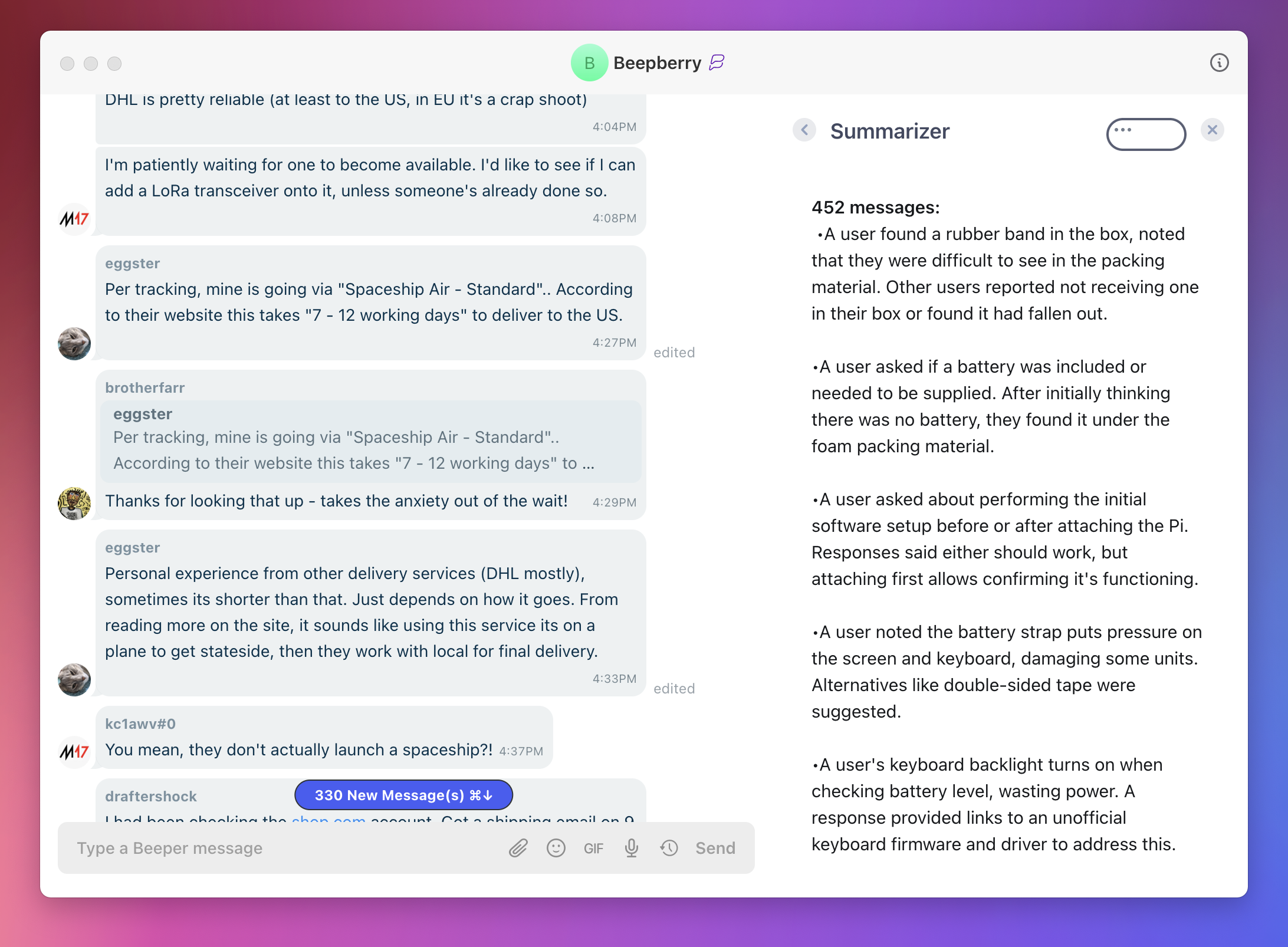
We’ve built two widgets: one that summarizes unread messages upon opening a busy chat, and one that provides useful information based on prior chat messages (such as suggesting ideas or providing information).
You can build widgets to do anything! As an example, your widget could:
Send pre-written messages.
Show info about everyone in the chat, using a data source like Clearbit.
Add items within a chat to your to-do list.
Try Beeper Widgets right now 🤳
Choose any of our pre-built widgets here, then follow these instructions to add it to Beeper!
How to create Beeper Widgets 🙌
Widgets you build today can be shared with any and all Beeper users, enhancing their chat experiences and earning you serious love from the community.
A quick tutorial gets you set up to develop your first widget in just five minutes. For a visual walkthrough, check out our Widget video:
Beeper Widgets are built on the wonderful matrix-widget-toolkit package by Nordeck. On top of it, we’ve added more widget functionality and made widgets available globally across all of your chats (rather than being installed on a per-chat basis). We’ve also created example widgets and a simple way to start building.
To hit us up about Beeper Widgets, get help, or share your latest creations, join our dedicated Matrix room #beeper-sdk:beeper.com. We’re excited to play with what you build!
Chat smarter, not harder with our handy cheat codes.
Building the best chat app on earth isn’t about reinventing the wheel. It’s about taking the burden of too many chat apps off your shoulders so you can focus on communicating. Secondly, it’s about baking in the best, most helpful chat features—like keyboard shortcuts—so Beeper can become the only app you need to rule them all.
Like steering wheel-mounted controls in your car, Beeper Shortcuts let you act smarter, not harder—juggling commands that compete for your attention without derailing your flow. Whether you just learned CTRL+C and CTRL+V yesterday to copy and paste or are such a shortcut pro that your mouse can’t remember the last time it felt the warmth of your caress, let’s dive into the power-ups available on Beeper!
🚨 Shortcuts were demoed with an Apple keyboard. For PCs: ⌘ = the CTRL key | ⌥ (Option) = the Alt key.
🔍 Search with ⌘+K
On Beeper, ⌘+K starts a Beeper Search so we live by the mantra “K is for Konnect!” The Search view also shows your recent chats for quick reference.
Replace foraging, clicking, and scrolling for who to message next with this handy cheat code—”K is for konnect!”
🗄️ Archive Power Moves
“Archiving chats? What is this—the future?”
Archiving chats you’re done with (for now) is a true pro-Beeper move. Type ⌘+E to archive and mark a chat as read.
Archive All Read Messages is another powerful Beeper command. From the Inbox, click the 🧹 or type ⌘+Shift+E for the shortcut. Chats return to the Inbox whenever new messages arrive, so archiving is a safe, non-destructive action that brings order to chaos.
The ⌘+; shortcut quickly toggles between Archive and Inbox views and pairs perfectly with the Archive actions above. Try them out!
🪄 Act on Unread Chats
Jump to your most recent unread chat with ⌘+U.
Changed your mind? Type ⌘+Shift+U to mark chats unread.
🗺️ Navigate Chat Lists
Hopping between Beeper chats comes in two flavors of shortcut.
Use ⌘+⌥ (Option)+⬆️ ⬇️ to open chats and mark them read as you move.
For a lighter touch, pressing Esc to restore the Beeper home screen, then hit ⬆️ or ⬇️ to navigate up and down the chat list without making changes. Press ENTER to open the highlighted chat.
🚲 Cycle Through Recents
If you frequently use ⌘+Tab (aka Alt+Tab on PCs), you’ll like using Ctrl+Tab to cycle between your twenty most recent chats.
Shortcuts for acting on recent messages may be familiar to Discord, Slack, Telegram users. Start at the Composer field where you write your chats:
Press ⌘+Shift+⬆️ ⬇️ to reply to recents in the thread.
Press ⬆️ ⬇️ to navigate and edit your recent sends.
Editing recent sends is currently supported in: Beeper / Matrix, Discord, Google Chat, Slack, Telegram, and WhatsApp.
🤯 A Shortcut…for Shortcuts?
When you want to jog your memory on a Beeper shortcut, there’s a shortcut for that, too! Type ⌘+/ for a scrollable cheat sheet:
📟 Don’t Be a Stranger
You’ve made it to the end! You may now resume your previously scheduled Beeping.
We’re hiring and are one chat away when you want help, have ideas and feedback, or a problem to report. Spread the love by sharing this post or subscribing to The Beeper Blog.
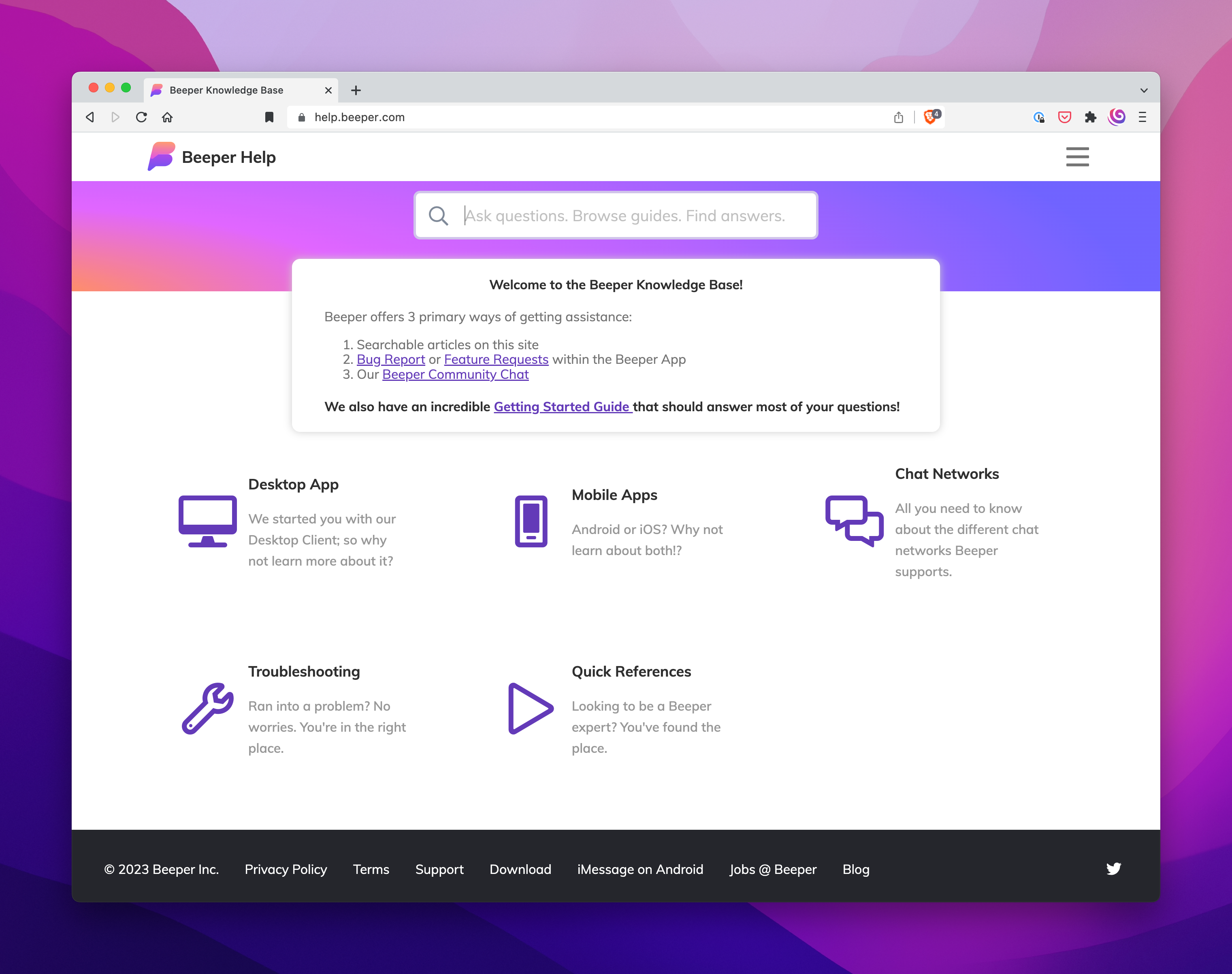
Whether you’re just starting out, looking to get the most out of Beeper, need help solving a problem, or have ideas and feedback to share, Beeper Support is at your service!
Your Beeper Helper is an AI-powered assistant to answer questions and guide you to through our vast array of help resources. On Beeper 🖥️ Desktop, click ❓ at the top of your chat list to call your assistant:
On Beeper 🍎 iOS, the assistant lives inside Settings (⚙️) » Support » Help:
To find your assistant on Beeper 🤖 Android, tap ⚙️ » Help:
📚 Self-serve Knowledge
Your Beeper Helper pulls its knowledge from help.beeper.com—our main support hub—where you can:
The Beeper Community chat is the place to be for all the Beeper discourse you want. Join fellow Beeper users by clicking ⚙️ » Join Matrix Room and search for Beeper Community.
🖥️ Beeper Desktop is currently required to join the group, but will sync to your 🤖 Android and 🍎 iOS apps once completed.
🛎️ Page a Concierge
Get direct assistance from Beeper’s support squad whenever you need it—just slide into our DMs!
🤳 A 1:1 chat with Beeper Help is created automatically when new users join Beeper. Simply send a DM whenever you need help from a Concierge. Search (Shortcut = ⌘+K) “Beeper Help” to get started.
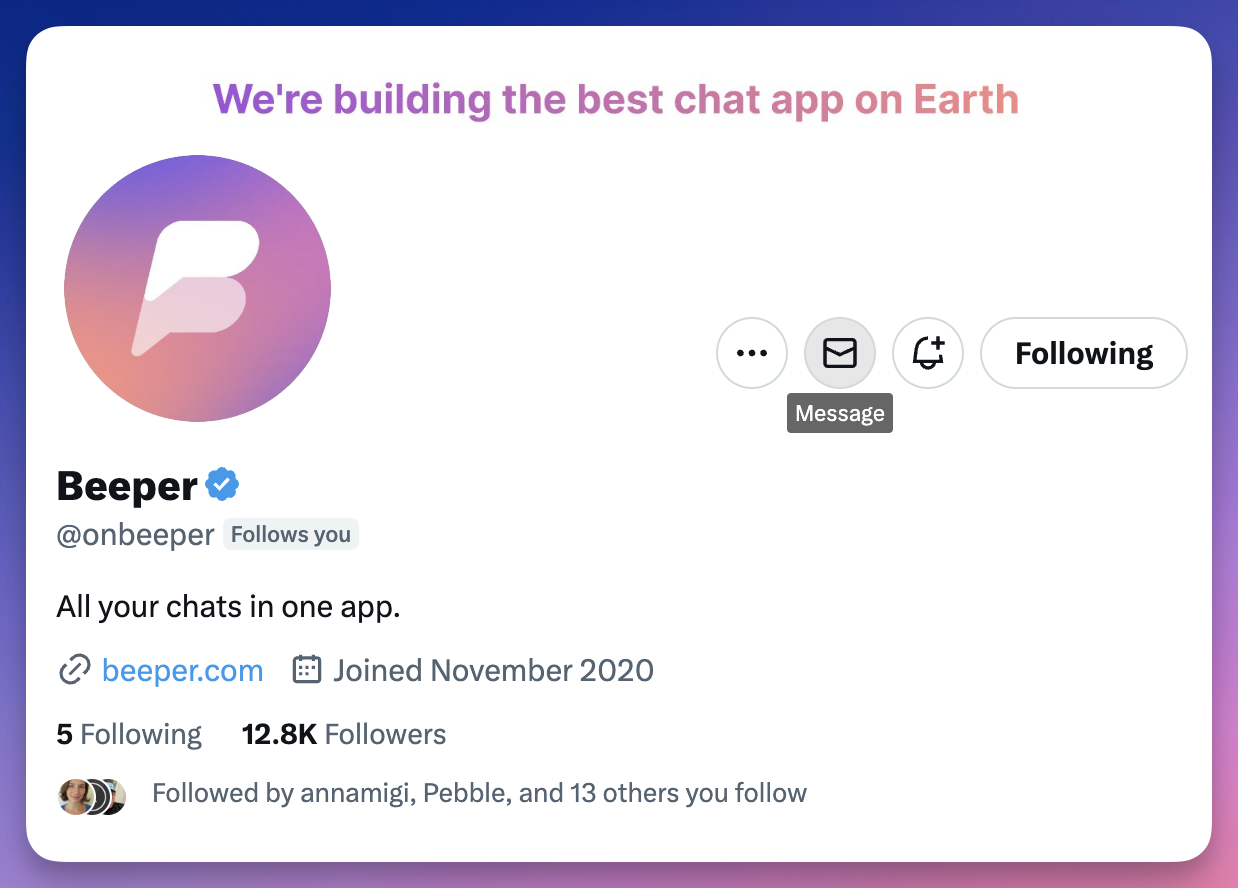
🐣 Sending a Twitter DM to @onbeeper routes directly to our Concierge team—a good open channel for folks who aren’t Beeper users yet.
Our quest to make Beeper the best chat app on Earth continues. Since sharing our State of the App update in March, we’ve grown the team, added popular features, slayed bugs, and invited many on the Beeper waitlist to join our community.
🙌 We are on track to hit “waitlist zero” in a matter of weeks. Beeper will open its doors to all soon, and we could not be more excited. ‘Til then, look back on the progress we’ve made, ICYMI.
All Beeper journeys start with the desktop app, and it wrangles chats better than ever.
💌 The Inbox, Redesigned
The Inbox is your Beeper base camp, so we’re obsessed with making sure it’s intuitive and satisfying—check out some of our favorites:
✔️✔️ Double blue checkmarks are shown if the chat has been read by the other person.
🪄 Control how your Favorites are ordered and set optional Auto-Archive rules in Settings (⚙️) » Inbox.
🎨 Toggle the formatting for Discord and Slack chats and decide if you’d like to have typing indicators ON or OFF in Settings » Appearance.
👩🚀 Spacebar
Not the one on your keyboard, silly 😜. The Spacebar in Beeper lingo is the menu showing icons of connected networks and Beeper Spaces (i.e. Inbox, Archive, Bookmarks, and Low Priority). On Beeper Desktop, it’s now a vertical shelf that can be toggled open or closed.
Spacebar provides a clear view of your chat networks, with keyboard shortcuts for speedy control:
⌘/CTRL + S to Collapse / Expand the Spacebar ⌘/CTRL + ; to Switch between Inbox / Archive views
💡 Pro Tip: Click the “hamburger” icon (aka the “club sandwich” or “stack of papers”) at the top left to expand and collapse the Spacebar as you like it.
🦸♀️ Schedule Messages with Natural Language
Beeper’s message scheduling feature—a team favorite!—works with any chat network. Scheduled messages deliver when you say so, even if Beeper or your devices aren’t running at the time. Even better: you can now set your timed messages with natural language commands 💣.
To schedule a message: click Scheduled Messages (🕓) and set your delivery time (e.g. “tomorrow at 8am”) in the refreshed menu. Schedule by precise mm/dd/yyyy, hh:mm in the field above.
🚀 Supercharged Forwarding
Message and media forwarding is a core feature Beeper handles like a champ. On Beeper, you have the power to forward messages to people on ALL of your chat networks at the 👏 same 👏 dang 👏 time.
Pass a hilarious GIF you received in iMessage to a Telegram group chat and your low-key-toxic boss on WhatsApp all at once. Beeper can handle it.
To forward: right-click on a message » select Forward Message » pick the contact(s) or group(s) you want with the search bar provided » click Send (or the keyboard shortcut: ⌘/CTRL + Enter).
🔍 Search
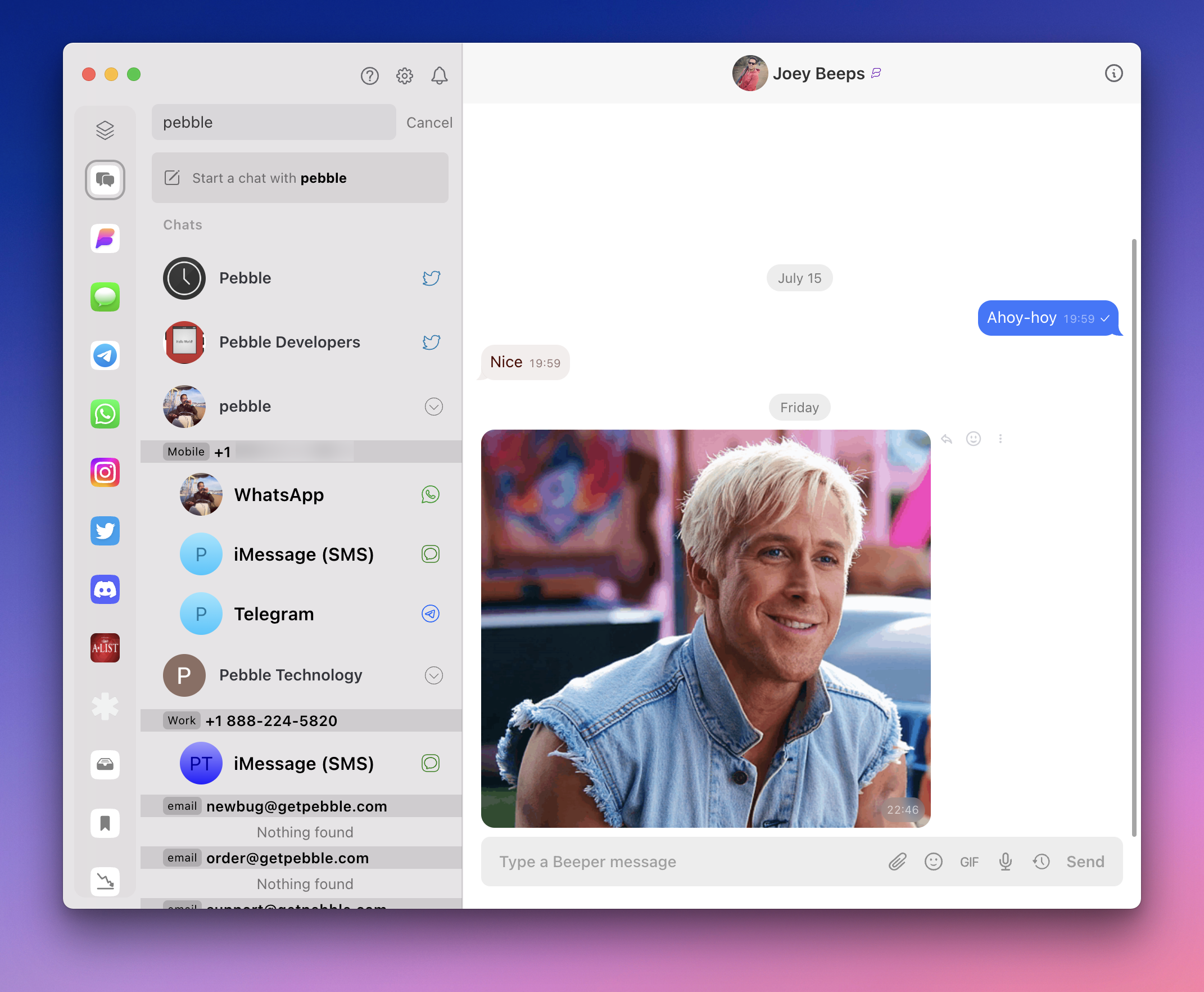
Beeper now delivers infinitely better search results (⌘/CTRL + K), making things more digestible at a glance. Results fall into two main buckets: Chats (aka contacts who match your search) and Messages (for conversations your search term appears in).
People results sort into one line per contact, expanding to show all the networks (e.g. iMessage, Telegram, WhatsApp, etc.) your friend can be reached at. We’re continuing to improve the search experience, and we’re working to bring full message search to Beeper iOS and Android as well.
💡 Pro Tip: Refine and filter your results with useful keywords like imessage, telegram, and whatsapp.
🤖 Beeper Android
🪐 New Spacebar = Out of This World
A fresh Spacebar experience arrived on Beeper Android just this week.
Dragging up from the bottom expands the new dock so you can search, reorder your Spaces, show or hide the Expanded Dock, and scroll through Recent Chats.
🏁 Beeper on Android Auto
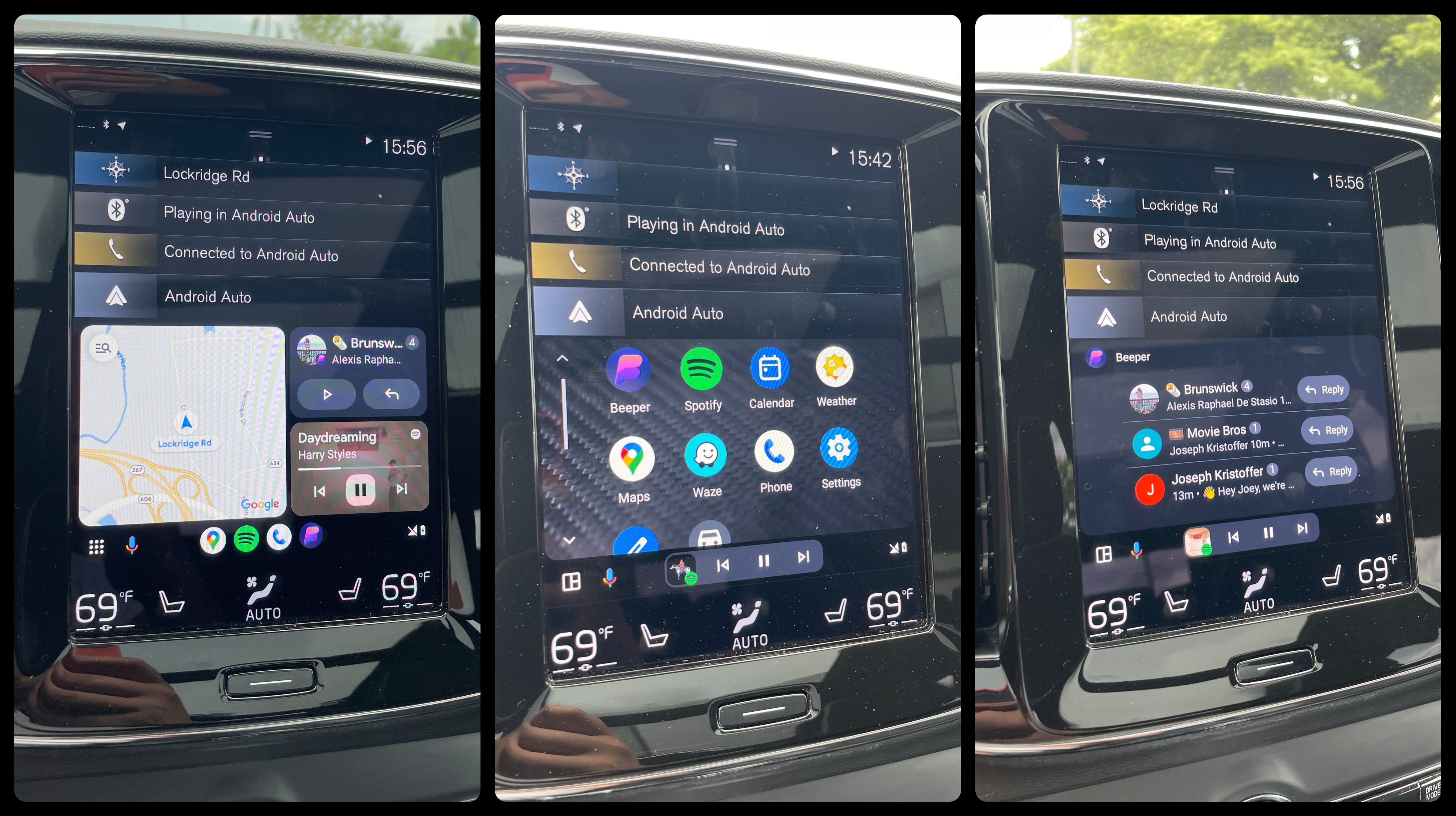
Beeper works beautifully with Android Auto! Chatting safely while driving feels so good: incoming chats arrive clearly, which Google Assistant can read for you. Easy-to-find buttons let you reply or mute the chat without taking your attention off the road.
The latest Beeper chat lives in Android Auto’s grid view of apps with buttons to read or reply (left). Opening Beeper (center) brings you to a list of recent chats to review or act on (right).
📥 New Inbox View
Our latest Android update sees the Inbox rebuilt from the ground up, better matching Beeper Desktop’s look and feel.
In addition to up to being 10x faster when “cold starting” the app fresh, long-pressing on chat threads and individual messages calls up an improved menu with popular commands and reactions.
⌚️ Notifications for the Pebble Watch
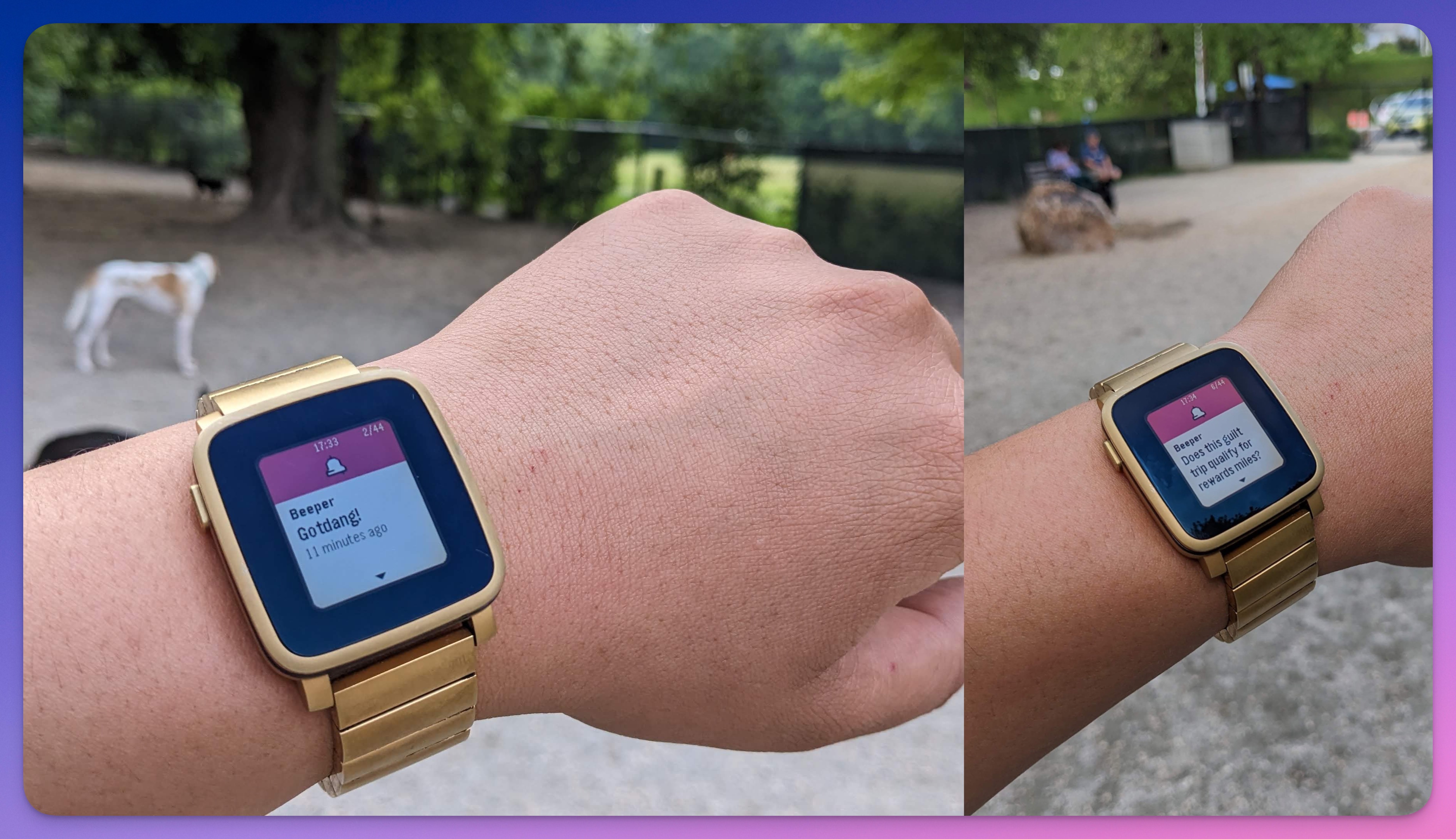
We threw it back in time, showing love to the Pebble community. Our pioneering smartwatch project has devoted, active Pebblers to this day.
Pebble watches paired to Android phones will show Beeper messages just like any other apps you’ve granted notification permissions to.
📸 Full-Res Photos for All Networks
Send full-resolution pics to all networks you chat on.
If you DO want to compress an image: tap the thumbnail in your draft message before sending it. Uncheck “Send image with the original size” in the Edit screen that pops up.
🧹 Dismiss Notifications When Read on Desktop
After reading a chat on Beeper Desktop, the status will sync to your other Beeper devices, clearing any old notifications.
Coming soon to Beeper iOS too!
⚡️ Speedy Start Ups
Beeper Android is super speedy now. Starting up in under a second, we shaved 1–2 seconds from previous load times. Dramatically speeding up the chat view is next on the menu.
🍎 Beeper iOS
✨ Revamped Chat View
We unveiled a comprehensive refresh to the Chat View last week—a project months in the making. We rethought the Beeper iOS experience from the ground-up, aligning better with how Beeper Desktop feels.
👇☝️ A floating Archive bar and Inbox button lets you toggle quickly between these two essential views:
💬 Redesigned message bubbles, replies, read receipts, and reactions look and work great:
🔠 Rich Text like links, phone numbers, mentions, Markdown, and more arrive with the proper formatting for the type of content it is:
🐇 Handling images, videos, and thumbnails is vastly-improved in the latest versions of Beeper iOS:
🥰 Thanks to all who took evolving iOS features for a spin in Labs. Your mindful feedback helps us every day in making Beeper more awesome.
✌️ Quick Reactions with Taps
Double-tap and tap-and-hold on Beeper iOS now match our expectations when chatting. Performing either finger combo unlocks emoji replies and quick actions:
📺 New Video Player
Our iOS team is really proud of the video player refinements we delivered. We hope you love it too:
Handy playback controls are at your fingertips, which get out of the way with a tap or after a few seconds:
🎁 Share to other apps.
⏪️ ⏩️ Jump forward or backward 10s.
🔒 Lock video orientation.
🐢 » 🐇 Menu (•••) » Set playback speed to: .5x, 1x 1.5x, or 2x.
🗄️ Menu (•••) » Download video.
After watching, any background audio Beeper paused for your video will resume.
⌨️ Emoji Shortcuts
Quickly add emoji like 🎉 while you’re chatting with keyboard shortcuts like :tada:.
A dynamic menu slides open when you type colon (:) plus a letter, refining your emoji choices as you get more specific.
🔍 Act on Search Results
Like Beeper Desktop, your search results can be Pinned, Favorited, Muted, and Marked Unread right from the Search view.
Results for the same contact across multiple chat networks are now shown in a single row with a dropdown.
♾️ Background Sync
Faithfully reflecting the state of your messaging life at all times is one of the most important things Beeper can do for you. Updating Beeper iOS to sync discreetly in the background means you can focus on your conversations without worrying anything’s been lost or delayed.
The upgrades to how Beeper iOS syncs also eliminated a bothersome lag we noticed when re-opening Beeper after being dormant for a while.
🌐 All Apps
In our march to make Beeper the only chat app you’ll ever need, we worked hard to craft an experience that’s consistent between devices:
📥 The Inbox now shows the read status of your chats (✔️ = you have read / ✔️✔️ = everyone in the chat has read).
💬 Google Chat is now available to connect!
🎙 Voice Messages
Voice notes can be up to ten minutes long—recording one is easy:
Click Send voice message (🎙️) to record. Trash or Stop recording with the buttons to the left of the sound wave.
🚧 Voice Notes for Beeper iOS is coming soon—ready on Desktop + Android now!
🍄 iMessage Power-Ups
As a top reason many users first come to Beeper, we have a lot riding on keeping the iMessage experience enjoyable and reliable. More and more people are stowing iMessage away with notifications off, trusting Beeper to handle things instead.
⚡️ Our iMessage bridge is now faster and more reliable.
✍️ Sending media with captions now works!
👯♂️👯♀️ You can now create new iMessage group chats on Beeper Desktop and Android. Support in Beeper iOS is not far behind!
👊 Beating Twitter & WhatsApp to the Punch
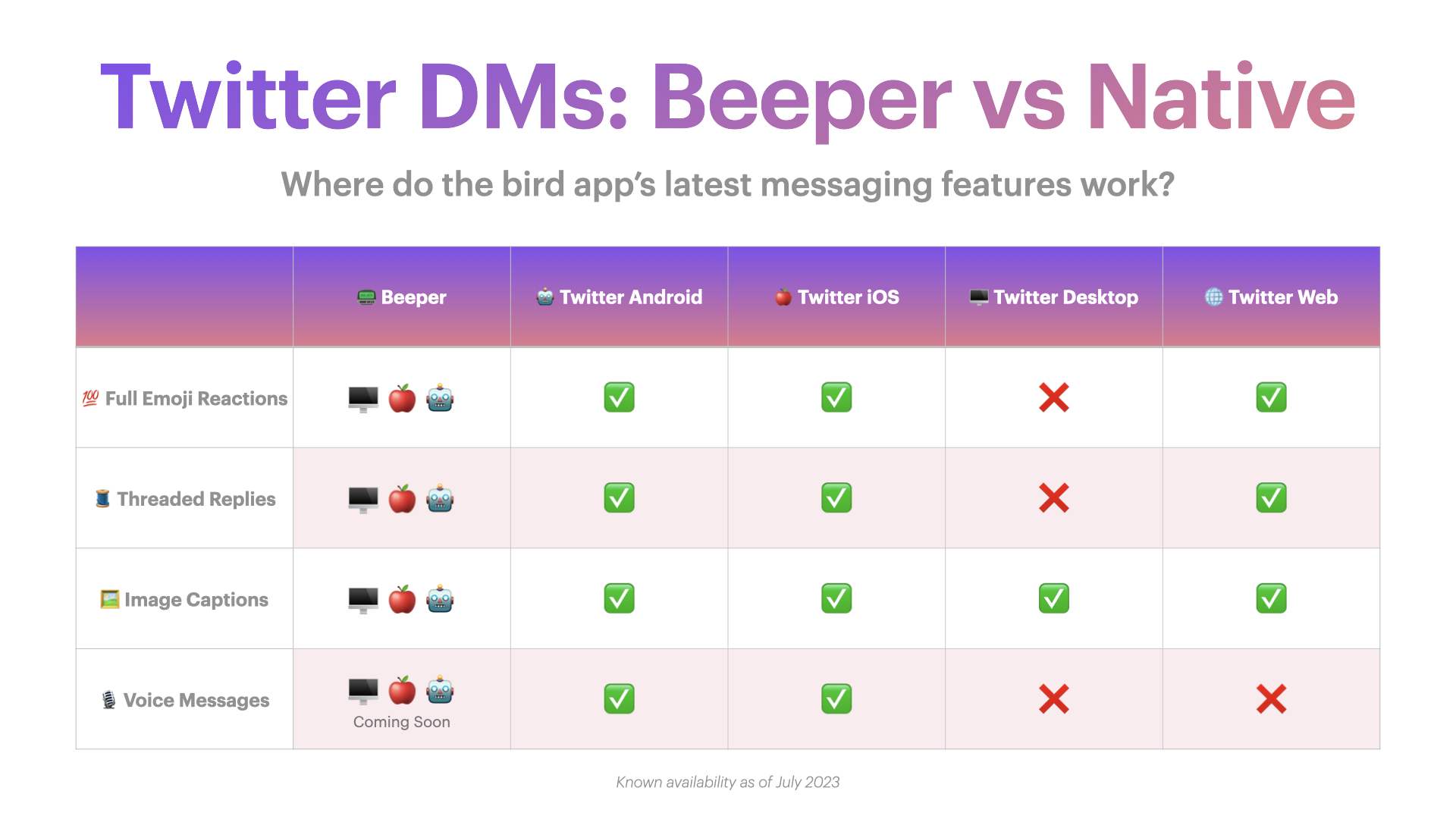
At Twitter, full emoji reactions, threaded replies, image captions, and voice messages came to their DM protocol in May, but we can’t blame you if you missed ‘em! Even now—with Beeper rolling out these DM features—Twitter’s own website and apps haven’t implemented them uniformly across their ecosystem.
Our team pulled the same magic on WhatsApp, rolling out support for uncompressed HD images and video (to all your chat networks, btw) while WhatsApp’s own implementation remains limited to select beta testers. 😏
👋 Reporting a Problem
The Beeper community’s feedback and diligent reporting is crucial to making Beeper more awesome. Please keep up the good work! To get help or connect with us quickly, you can:
🤙 Submit feedback or search our Knowledge Base right from our apps.
🤳 Upload screenshots or video and provide additional metadata to your help reports.
📋 Long press any message » Report a Problem to alert our team with useful background information relevant to that message/conversation automatically attached.
👀 What’s Next?
We’ll be in touch more regularly here and elsewhere as we keep working on the only app that let’s you “chat wherever they’re at.” Until next time, here’s a peek at some of the things we’re currently working on:
✨Stickers✨ and better GIFs selection.
🤝 Google Messages bridge—with RCS support!
🕵️ Deliver a new Search interface for iOS and Android.
🗑️ Delete chats and block contacts.
💬 Refreshing Beeper Android’s chat view and speeding up its performance.
⬆️ Add Beeper to the iOS sharing menu.
💅 Continued refinement of Beeper iOS’ Chat view.
📶 Improving performance in low-bandwidth scenarios (e.g. underground on a subway, low signal strength in remote areas, etc.).
🚧 Rebuilding our Signal bridge for performance, speed, and reliability.
😜 Please do not ask us for ETAs. If you ask, we’ll slow work down on purpose—j/k!
Introducing Beepberry – a portable e-paper computer for hackers, designed for chatting on Beeper
Last year, I had an idea for a fun side project – I wanted to create a ‘weekend’ device that would let me stay in touch with friends and family, without the distractions of a full smartphone. I imagined a tiny, hackable e-paper screen with a physical keyboard, powered by a Raspberry Pi, that I could use to chat and pretty much nothing else.
Before Beeper, the idea probably would not have gone anywhere. Most chat apps do not have an API, making it practically impossible to hack something like this together.
Enter Beeper, with connections to 15+ chat networks. Built on top of Matrix, Beeper is fully hackable. You can write alternative clients, bots and more!
I reached out to @sqfmi (who had built the amazing Watchy) and we teamed up to create this tiny computer.
If you’re a hacker and want to play with one, you can pre-order one today for $79:
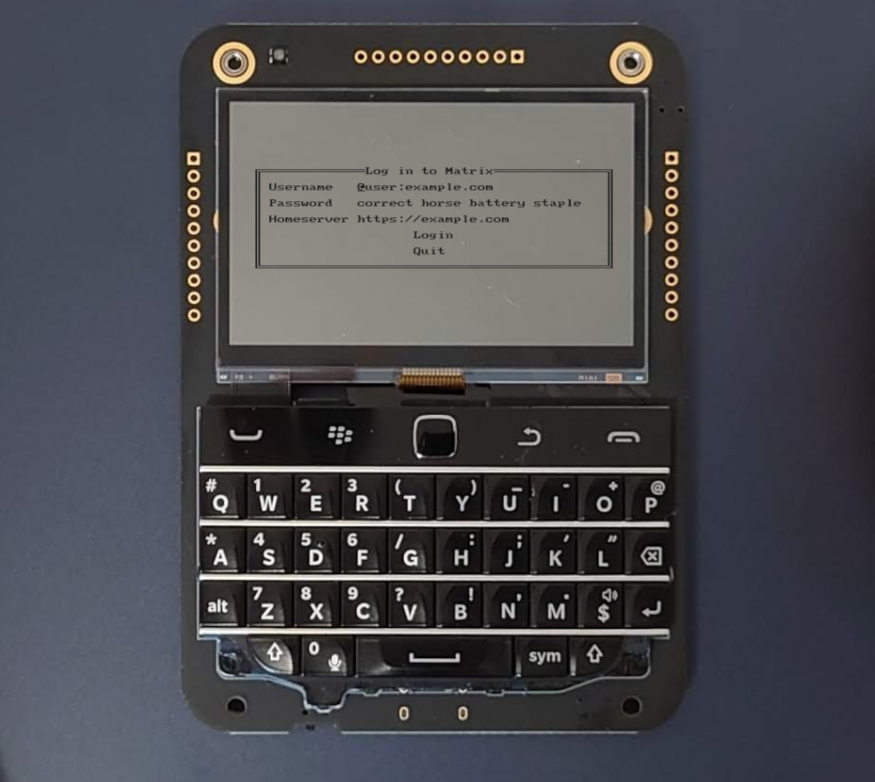
Beepberry is a portable computing device, with a beautiful high contrast, high resolution display, and a tactile keyboard + touchpad. It is the ultimate everyday hacking gadget.
Powered by the Raspberry Pi Zero W (or any other compatible SBCs), you can use it as a chat device (supporting all chat networks on Beeper e.g. iMessage/WhatsApp/Signal/etc. ) or use it as a hackable handheld cyberdeck, running any Linux application that runs on the Pi.
This is not a finished product. It is a devkit!
Specs
Open source hardware & software
Ultra-low power high contrast Sharp Memory LCD 2.7″ 400 x 240
Raspberry Pi Zero W (included) and compatible low profile header
Connectivity: wifi and bluetooth
Tactile Keyboard w/ Backlight and Touchpad
Programmable RGB LED for notifications and side button
Onboard RP2040 Controller (for keyboard and peripherals control)
GPIOs breakout
USB-C programming & charging
2000mAh LiPo battery
You supply a micro SD card
This is for hackers!
You must be familiar with Linux in order to get any sort of value out of this device! There is no case (though you can 3D print one!), the battery hangs off the back, and you need to configure/set up the software. Don’t expect something perfect.
Ideas…
We’ve created a skinned version of gomuks (CLI Matrix client), optimized for e-paper screen.
Expand via USB ports or GPIO. Add an LTE modem, LoRA, etc.
I wanted to give you an update on where Beeper is at right now and what our road map looks like for the next 6 months.
As a quick refresher, Beeper is a universal chat app. Beeper connects to 15 different chat networks and aggregates all your chats into a single inbox. We have apps on iPhone, iPad, Android and Desktop (Mac/Windows/Linux). Our mission is to build the best chat app on Earth.
Today @ Beeper
Beeper is ready for you to use! It’s fast, free, trustworthy and fun. Over the last 2 years since our initial product announcement, we’ve focused on building a solid and reliable foundation. Today, Beeper has all the features you need to switch to using it as your default chat app.
We are currently still in waitlist mode, which means that you need an invite to download and use the app. We are sending out new invites every day, but obviously this is not ideal – we want as many people as possible to get the chance to use Beeper! Over the next 3 months, our goal is to finish everyone on the waitlist. At that point, anyone who downloads Beeper will be able to start using it immediately – no more waiting.
Who is Beeper for today?
We’ve designed Beeper for 3 types of people:
People who want to check one chat app instead of 5+ different apps
Android and Windows folks who want full iMessage functionality (blue bubbles and more!)
People who want to use features that Beeper offers that go beyond the capabilities of other chat apps, like auto-archiving chats after you read them, scheduling messages to be sent in future and being able to search your entire chat history across all networks
Expect all chat features you would use in an average day to work great in Beeper:
Text, image, video, and audio messages
DMs, group chats, and channels
Blue bubbles on iMessage (for everyone!)
Typing status
Replies, threads and emoji reactions
Sent confirmation status
Receiving stickers
Who is Beeper NOT for today?
Over time, we have an inclusive mission to build the best chat app on Earth. Today, in order to build a powerful and useful app, we’ve had to focus on a narrower set of capabilities. That means that Beeper is not for everyone, just yet.
If you expect 100% feature parity to all other chat apps, you’re not going to have a great time. Beeper works great alongside existing apps, not replacing them entirely. 99% of your daily usage will be in Beeper, but from time to time you may have to go back to the original app for a rarely used feature.
Slack and Discord power users – Beeper is not designed for you. We’re currently focused on DMs, group chats and small channels, and don’t support super-busy 1000+ person communities. On the other hand, Beeper is fantastic for casual Slack/Discord users (ie if you’re forced to use it to chat with friends or colleagues)
For example, here are a few features that Beeper does not support (yet!):
Receiving audio/video calls (you will be notified though)
Most people will place Beeper on their smartphone home screen, and move all other chat apps into a folder. You should keep all chat apps installed, just in case you need to use a feature that is not supported yet in Beeper.
Please note:
You must disable notifications on the other apps, or else you will get duplicate notifications!
WhatsApp and Signal apps MUST be kept on your phone! Do not delete these apps while they are connected to Beeper.
6-Month Road Map
As always, our top priority is to make Beeper reliable and trustworthy. If you spot a reliability issue (message not arriving on time, persistent problems sending messages), let us know and we’ll work to fix it asap.
Here’s what we’re working on over the next 6 months:
Ditch the waitlist – soon anyone will be able to download and use Beeper!
Speed up the app
Interacting with Beeper is not as fast as we want it to be. Our mobile apps shows a loading spinner too much. Performance in poor internet connectivity (ie 4G or in a subway/train) is not great. Expect major improvements here.
Mobile app design refresh
Our mobile apps don’t look fantastic yet. We’re working on this. Spoiler alert: you will be really excited to see what we have in the works here
Improve iPhone app
Our iOS app has improved tremendously over the last year. It’s basically an entirely new app, rewritten piece-by-piece. But it’s still missing a few key features. We have a 4-person iOS engineering team pumping out improvements. Checkout the full list of iOS improvements in the pipe.
New search interface
Right now, things are a bit confusing – we have separate ‘search’ and ‘start new chat’ buttons. We’re integrating these two things together into a much improved unified interface.
Improve media experience on Beeper
Beeper can send and receive media like photos, videos, links, voice messages and more. But the experience is not beautiful and feels a bit clunky. We’re going to make it fast and feel awesome. Expect full sticker support (plan is to import all Telegram stickers), faster uploads, iMessage live photos and more!
Add missing features
There are a bunch of smaller features that we are working on that should be ready later this year, like:
Being able to delete chats and block spammers
RCS
Snooze
iCloud contacts on Windows
Whatsapp typing status
Better, more granular notification settings (eg mute all chats from a specific network)
Chat with your friends on Beeper
As we wrap up ‘the basics’, we’re going to be building features that make it fun to chat with your friends on Beeper. Did you know that you can chat with other Beeper users directly? Beeper is built on top of Matrix, an open source chat protocol. Every Beeper user has a unique identifier (@username). If we detect that you and the friend you are chatting with are both on Beeper, we’ll make it easy to send messages via Beeper rather than a legacy chat network.
How to help us make the Beeper even better
As of today, you should find Beeper to be extremely reliable. If you notice even the smallest issue, please do not hesitate to let us know.
We take reports of reliability issues very seriously. For example, if you report that one specific message was not received immediately (within a few seconds), we actually drop what we are doing and investigate. That is how important reliability is to us – luckily it happens very infrequently. If you see something, say something.
We also want to hear from you about how you use Beeper. How does it fit into your life? What do you want us to build to make Beeper the best chat app in the world for you?
Come work with us!
We are looking for 3 new colleagues to join our 20 person fully-remote team. If you’re interested, please apply through our website (please mention you are a Beeper user!):
Senior Frontend Engineer – join our 3-person team building Beeper Desktop (maybe…web app too some day?)
Backend Engineer – we’re specifically looking for folks with experience and/or great interest in reverse engineering. We’re primarily a Go shop and open source most of our code on github.com/beeper
Customer Experience Hero – help us continue to deliver amazing customer service and troubleshooting help!














 Beeper Blog